127.8k stars · Apache-2.0 and MIT | v0.9.92, 16 Oct 2026 | [graphify.com](https://www.graphify.com) · v0.9.92 (2026-10-16) · Track this in Rising ↗
Reads a project and draws a clickable map of how its parts connect.
Radar check
What we found when we opened it. Every bar is one fact, with its date.
Last code pushed 23 Oct 2026, 4 days before this check.
Latest release v0.9.95 on 23 Oct 2026.
Public since April 2026, 6 months.
134,509 stars and 12,838 forks.
1,259 commits and 1019 new issues in the last 90 days.
362 contributors. No pull requests merged in 90 days; changes go in directly.
A security policy says how to report a problem. 1 published security advisory.
How the bars are scored
- Alive. Days since the last code push: a week or less 100, a month 90, three months 70, six months 50, a year 30, eighteen months 15, older 0.
- Releases. Age of the latest GitHub release, on a similar scale; no bar when the project publishes no releases.
- Maturity. Age of the project: eight years 100, five 90, three 70, two 55, one 40, six months 25, younger 10.
- Adoption. Stars on a log scale: 100,000 stars is 100, 10,000 is 80, 1,000 is 60, 100 is 40.
- Activity. Commits in the last 90 days: 300 or more 100, 100 85, 30 65, 10 45, any 25.
- Community. People who have contributed: 100 or more 100, 30 80, 10 60, 5 40, 2 25, one 10.
- Security. A published security policy 80, none 40; published advisories are listed, not scored.
Checked by Repo Radar on 25 Oct 2026 from the repository on GitHub. Covered in Edition 16.
▶Repo detailsthe review · specs · pros & cons · install
What it does
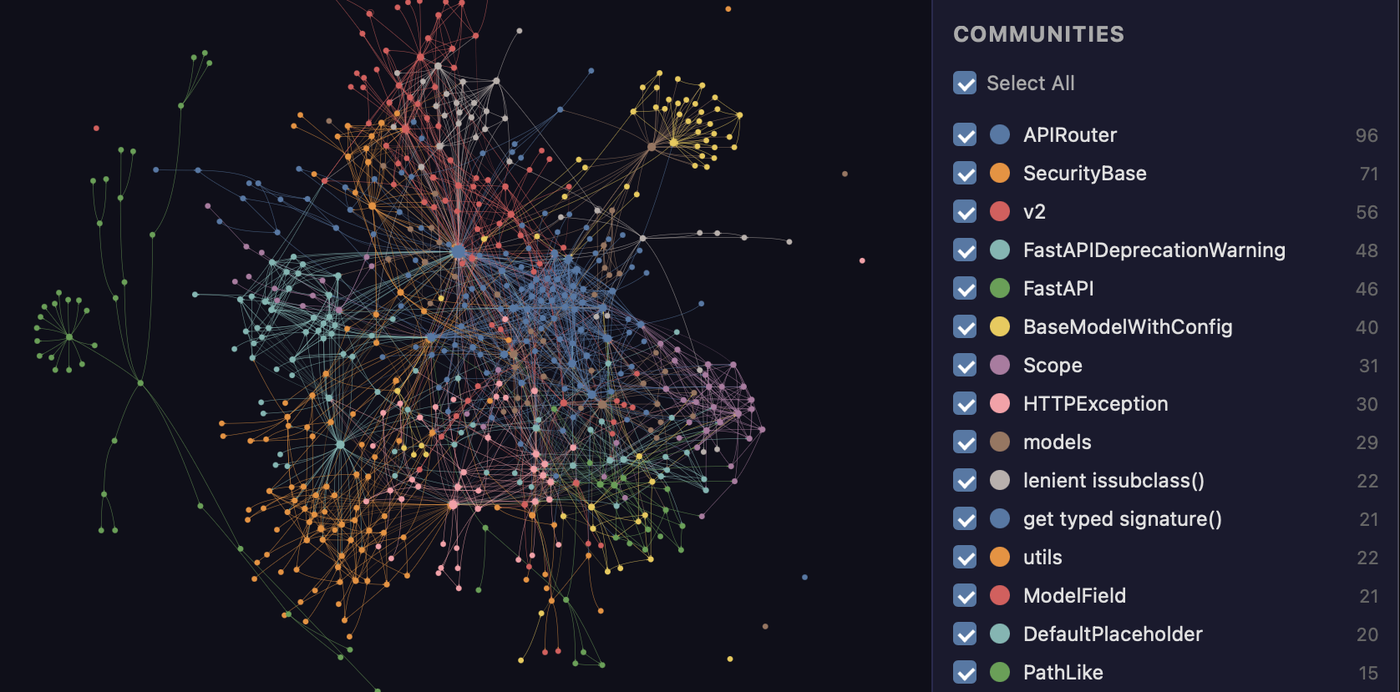
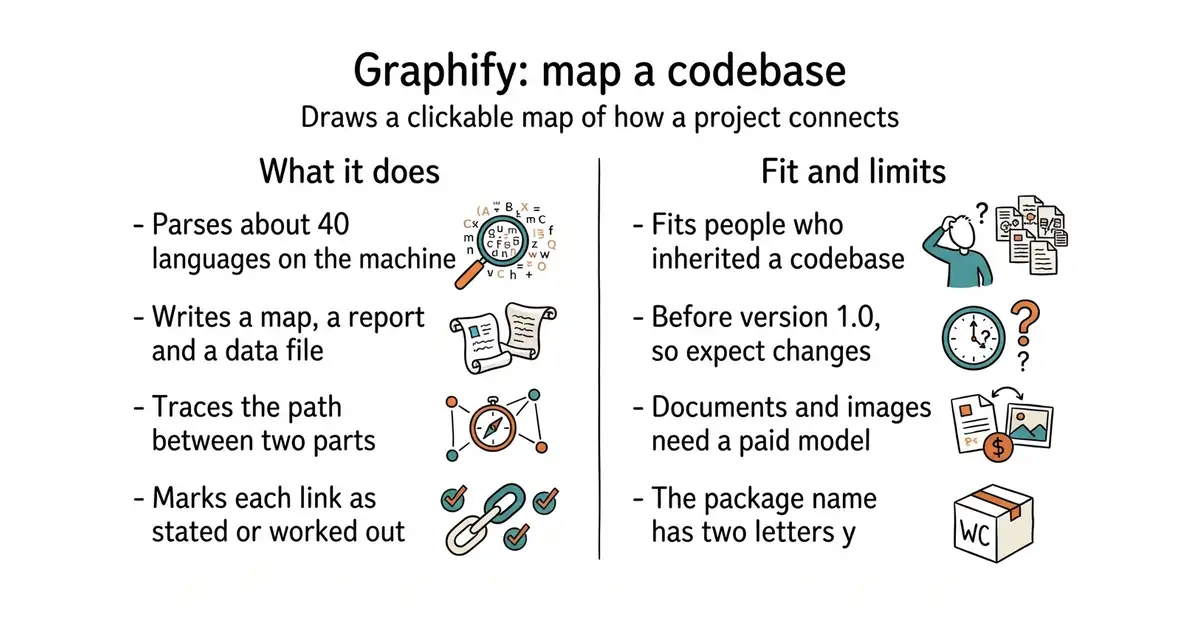
Graphify reads the files in a project and builds a graph of the things in them and the named connections between those things. It parses code in about 40 programming languages with tree-sitter, a fast parser that runs on the machine it is installed on. A run writes a folder called graphify-out holding three files: graph.html to click through in a browser, GRAPH_REPORT.md to read, and graph.json to query later without reading the source again. Every connection is marked either as stated in the source or as worked out by the tool, so the two are never confused. It can answer questions about the graph, trace the shortest path between two parts, group the project into subsystems, and export a call-flow diagram. Documents, PDFs and images are read by a model instead of the local parser, and audio and video are transcribed on the machine. It does not use embeddings or a vector store, it does not send code to a model, and its install step does not set up a connection for an assistant to call it directly.
Why it matters
Who it suits. It fits someone who has inherited a codebase, or written one over six months and lost the thread of it. It also fits anyone who has to explain a system to a new person and has no diagram to point at. The three outputs are the useful part: one to look at, one to read, and one a program can query. Skip it if the project is small enough to hold in your head, or if the interesting material is all in PDFs and documents rather than code, because that is the half that needs a paid model.
Verdict. Worth an hour to run once on the largest project you have, and worth keeping if the report tells you something you did not know. The code side is free and offline, which is the strongest thing about it. Two cautions. It is still at version 0.9.92, so expect the commands and the output shape to change between versions. And the package name on PyPI is graphifyy with two letters y, while the command is graphify with one — an easy five minutes to lose. Use it alongside a search tool rather than instead of one; a graph answers "how does this connect", not "where is this word".
Summary (Key Points)from the README
Key features
- Local code mapping: Code is parsed with tree-sitter AST across about 40 languages, with no LLM, and nothing leaves your machine.
- Tagged edges: Each connection is labeled EXTRACTED (explicit in the source) or INFERRED (resolved by graphify).
- Graph, not vector index: No embeddings or vector store. You query, trace paths between two things, or explain one concept.
- God nodes and communities: The most-connected concepts are surfaced, and the graph is split into subsystems with Leiden clustering and LLM-free labels.
- Rationale linking: `# NOTE:` and `# WHY:` comments and ADR/RFC citations become nodes linked to the code.
- Mixed inputs: Docs, PDFs, images, and video/audio map into the same graph.
- Reported benchmarks: LOCOMO recall@10 is 0.497, against 0.048 for mem0 and 0.149 for supermemory. LongMemEval-S QA accuracy is 76%, tied with dense RAG. On an ERPNext cross-tool test, key-fact coverage is 82.0%, against a grep/read baseline of 70.8%. Graph build uses 0 LLM credits.
- Always-on hooks: On Claude Code and Gemini CLI, a hook fires before search-style tool calls and nudges the assistant toward graph queries.
- Three outputs: The build produces graph.json, GRAPH_REPORT.md and graph.html.
Ways to install
| Platform or method | What it needs | Effort |
|---|---|---|
| uv (recommended) | Python 3.10+ and uv; then `graphify install` | Low: two commands in the quickstart |
| pipx (alternative) | Python 3.10+ and pipx | Low: same post-install step |
| macOS (Homebrew) | Homebrew and Python 3.10+ | Low: dedicated quick-install section |
| Windows | Python 3.10+ and the Windows quick-install steps | Low to medium: PowerShell quoting may matter |
| Ubuntu/Debian | Python 3.10+ and the Ubuntu steps | Low: dedicated quick-install section |
| Per-assistant install (20+ platforms) | The assistant you use; a platform-specific `graphify ... install` command | Low per platform; some need extra steps such as Codex's `multi_agent = true` setting |
Important
- Package name: The PyPI package is `graphifyy` (double-y). Other `graphify*` packages on PyPI are not affiliated. The CLI command is still `graphify`.
- Semantic pass needs a model: Docs, PDFs, images and media use your assistant's model or a configured API key. A code-only run needs no key, and `--code-only` skips the docs on mixed repos.
- Data routing: `graphify extract` picks a provider from whichever API key is set. Kimi (MOONSHOT_API_KEY) routes to Moonshot AI servers in China. Use `GRAPHIFY_BACKEND=ollama` or `GRAPHIFY_BACKEND=none` to keep data local or disable LLM backends.
- Silent misparsing: Ambiguous extensions such as `.inc`, `.h` and `.m` can parse as the wrong language with no error. Declare them in `.graphifyrc`.
- Clustering fallback: Without the `leiden` extra, clustering silently uses networkx Louvain. Switching later reshuffles every community, so plan a full relabel.
- Pi requirements: The Pi guard needs Pi 0.58.4 or newer and a persistent Graphify install, not `uvx`.
- Query logging: Queries are logged to `~/.cache/graphify-queries.log`. Set `GRAPHIFY_QUERY_LOG_DISABLE=1` to opt out.
- Visualization limit: `export html` defaults to a 5,000-node limit and renders an aggregated view above it.
- Graphify Cloud: The README promotes a paid-tier service with a 14-day free trial. Its pricing is not described.
Written by an AI model from the project’s README; not part of the review, and it can be wrong.
- Code never leaves the machine. The parser is local and no key is needed for a project that is only code.
- Three outputs, not one: a page to click, a report to read, and a file to query later.
- Every connection says whether it was found in the source or worked out, so a guess is never presented as a fact.
- It is still before version 1.0. The commands and the output format are not settled.
- Documents, PDFs and images need a model, so the half of the feature list that reads prose is not the free half.
- The package is spelled
graphifyyand the command isgraphify. Nothing warns you if you install the wrong name.
uv tool install graphifyy
graphify install