In simple English
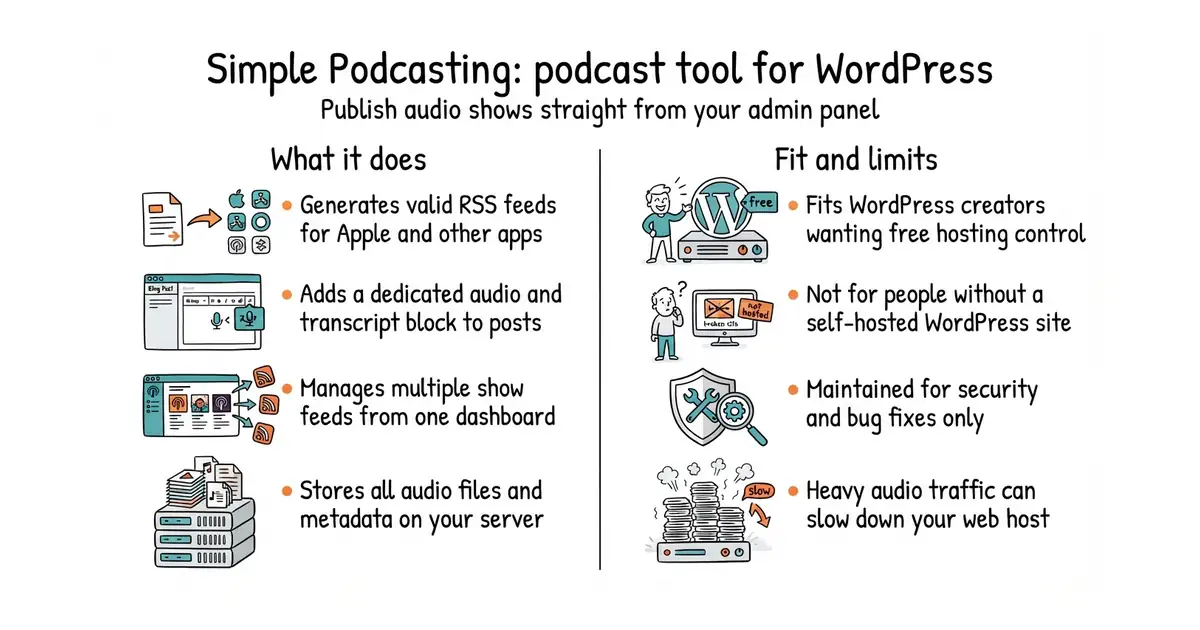
This tool turns your WordPress site into a podcast host. You can manage multiple shows and publish audio episodes as normal posts. It generates the special RSS feeds you need to submit your show to directories like Apple Podcasts. Your listeners can play audio and read transcripts using blocks built directly into the WordPress editor. It costs you nothing to run and needs no external hosting service.
What it is
A WordPress plugin that adds podcast management feeds and blocks to your site. It handles episode metadata, transcripts and XML feeds without any third-party software.
What it is good for
Solo builders and creators who already run a WordPress site and want to launch a podcast without paying for a dedicated podcast hosting platform.
- Runs entirely inside your existing WordPress site without external hosting fees.
- Supports multiple distinct podcast feeds from a single dashboard.
- Includes dedicated blocks for audio players and time-coded transcripts.
- Requires an active self-hosted WordPress installation and proper PHP settings.
- Heavy podcast traffic can consume significant bandwidth on your main web server.
- The maintainers are in maintenance mode, so expect only bug fixes and security patches.
A paid third-party podcast hosting service or manual RSS feed creation.
A WordPress caching plugin to speed up feed generation for heavy listener traffic.
- Automattic/jetpack1.9k stars
Includes podcasting features and audio block support for WordPress sites.

- facebook/docusaurus67k stars
A static site generator from Meta that turns Markdown files into a documentation website.
- mkdocs/mkdocs23k stars
Turns a folder of Markdown files into a documentation website, controlled by one settings file.
- squidfunk/mkdocs-material28k stars
Turns a folder of Markdown files into a searchable documentation website, with every formerly sponsor-only feature now included.
Install the plugin via the WordPress admin panel by searching for Simple Podcasting, or download the ZIP file from GitHub and upload it through your plugins page.