38.7k stars · MIT · v3.3.1 (2026-08-20) · Track this in Rising ↗
Self-hosted, cookie-free website analytics — the measurement floor for every other marketing move.
Radar check
What we found when we opened it. Every bar is one fact, with its date.
Last code pushed 23 Oct 2026, 4 days before this check.
Latest release v3.4.1 on 23 Oct 2026.
Public since July 2020, a little over 6 years.
39,734 stars and 8,431 forks.
198 commits and 106 new issues in the last 90 days.
439 contributors. 62 pull requests merged in 90 days.
No security policy file says how to report a problem. 2 published security advisories.
How the bars are scored
- Alive. Days since the last code push: a week or less 100, a month 90, three months 70, six months 50, a year 30, eighteen months 15, older 0.
- Releases. Age of the latest GitHub release, on a similar scale; no bar when the project publishes no releases.
- Maturity. Age of the project: eight years 100, five 90, three 70, two 55, one 40, six months 25, younger 10.
- Adoption. Stars on a log scale: 100,000 stars is 100, 10,000 is 80, 1,000 is 60, 100 is 40.
- Activity. Commits in the last 90 days: 300 or more 100, 100 85, 30 65, 10 45, any 25.
- Community. People who have contributed: 100 or more 100, 30 80, 10 60, 5 40, 2 25, one 10.
- Security. A published security policy 80, none 40; published advisories are listed, not scored.
Checked by Repo Radar on 27 Oct 2026 from the repository on GitHub. Covered in Edition 5.
▶Repo detailsthe review · specs · pros & cons · install
What it does
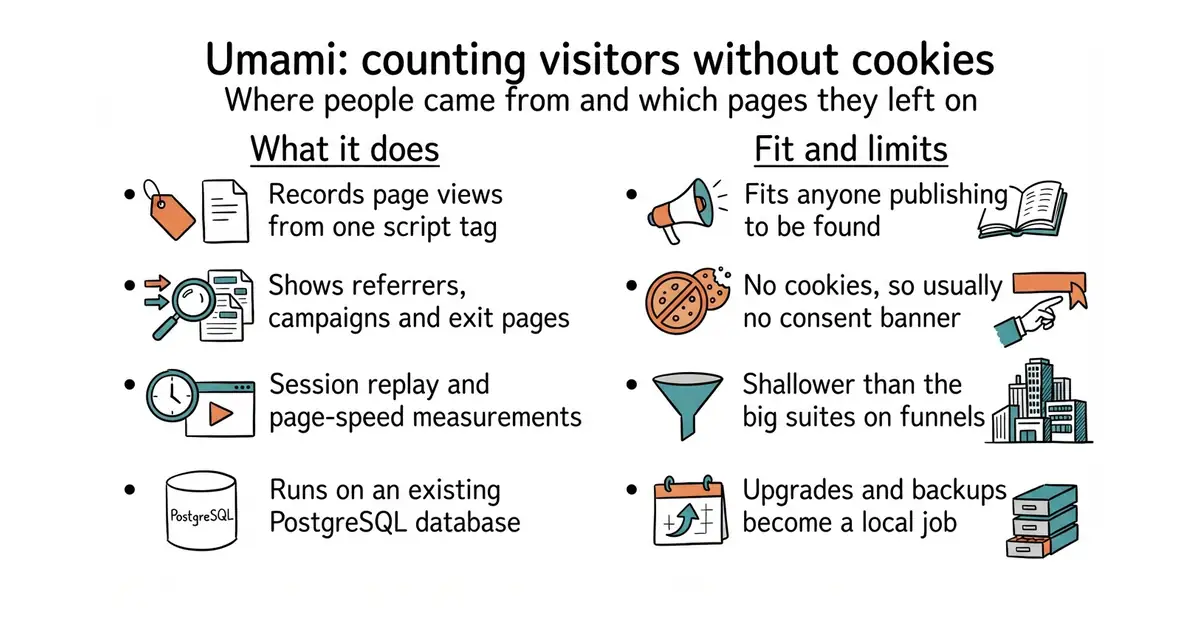
You add a small script tag to a site and it records page views. The dashboard shows visitors, page views, where people came from, which campaign links they followed, which pages they left on, and how fast pages loaded. Goals can be defined so a particular action is counted as a conversion. Recent versions add custom dashboards, Core Web Vitals, which are Google's three page-speed measurements, and session replay, which plays back an anonymous recording of one visit. Several people can have accounts, and sites can be grouped. It needs Node.js 18.18 or newer and PostgreSQL 12.14 or newer, and it reuses a database that is already there. What it does not do is match a full analytics suite on deep questions: there is no serious funnel or cohort analysis, and the README names PostgreSQL as the only supported database.
Why it matters
Who it suits. Anyone publishing anything with the intention of being found. Campaign links are the part that pays immediately: they turn "an article was published" into "that article sent nine people, two of whom signed up". It also suits anyone who wants visitor figures without a consent banner, since no cookies are set. Skip it if the questions are about cohorts and multi-step funnels, because a heavier product answers those. And skip it if the site already has a working analytics tool, because two of them is a maintenance job for no new information.
Verdict. Worth two hours, and the first thing on this page to install. It is in excellent health: 39,311 stars, a release on 17 September 2026, code landing on 11 October 2026, and only 42 open issues for a project that size. The session replay in current versions is more useful than it sounds, because watching six real visits through a confusing screen beats any amount of discussion about what to fix. Two honest costs. Upgrades, backups and uptime become somebody's job, which is one more service on a machine that entry #8 now measures. And it is deliberately shallower than the large commercial products, so a question about cohorts will eventually go unanswered. plausible/analytics is the closest alternative and is a heavier install; PostHog/posthog answers the deep questions and costs far more to run.
Summary (Key Points)from the README
Key features
- Privacy-first analytics: Tracks traffic, campaigns, behavior, conversions, and revenue without cookies.
- Deployment choice: Runs self-hosted or in the cloud.
- Two-factor authentication: Available once you set a 64-character hex `TWO_FACTOR_ENCRYPTION_KEY`, which you can generate with `openssl rand -hex 32`.
- MCP endpoint: Set `MCP_ENABLED=1` to enable the `/mcp` endpoint, then authenticate with an API key from Settings → API keys.
- Configurable base URL: `API_URL` changes the base URL for internal UI API calls. Relative paths are served under `BASE_PATH`, and absolute URLs are proxied through the local `/api` route.
- Docker images: Official images and a Docker compose file that runs Umami with a PostgreSQL database.
- Simple updates: Pull the latest source or Docker images, install any new dependencies, and rebuild.
Ways to install
| Platform or method | What it needs | Effort |
|---|---|---|
| Installing from source | Node.js 18.18+, PostgreSQL v12.14+, an `.env` file, a build step, and a start command | Moderate |
| Docker image | Docker, plus a PostgreSQL database you provide | Low |
| Docker compose | Docker and Docker compose; the file runs Umami with PostgreSQL | Low |
Important
- Default login: The build step creates a user with username `admin` and password `umami`. Change these credentials right after installation.
- Database tables: The first build creates the database tables automatically.
- Two-factor authentication: It stays unavailable, and cannot be required, until `TWO_FACTOR_ENCRYPTION_KEY` is set.
- MCP is off by default: You must set `MCP_ENABLED=1` before the `/mcp` endpoint works.
- Port and proxy: The source install launches on a default port, and you must either proxy requests from your web server or change the port to serve the app directly.
- Version requirements: Source installs need Node.js 18.18 or later and PostgreSQL 12.14 or later.
Written by an AI model from the project’s README; not part of the review, and it can be wrong.
- Reuses an existing PostgreSQL database, so the install is one container rather than a new service to back up.
- No cookies, so in most places no consent banner is needed and the landing page stays uninterrupted.
- Session replay and page-speed measurements are included, which removes two more tools from a future shopping list.
- Shallower than the large commercial suites on funnels and cohorts: fine for a small site, a limit later.
- Upgrades, backups and uptime are now a local job, on a machine that is probably already busy.
- PostgreSQL is the only database the README supports, so an existing MySQL is of no help.
# Docker, the quickest route
git clone https://github.com/umami-software/umami.git
cd umami
docker compose up -d
# Or from source against an existing database
pnpm install
# .env with DATABASE_URL=postgresql://user:pass@host:5432/umami
pnpm run build       # creates the tables on first run
pnpm run start       # serves on localhost:3000