48.5k stars · MIT · v52.19.1 (2026-08-19) · Track this in Rising ↗
Markdown-driven presentation tool — the explainer slides in a tutorial video, plus a PDF export that doubles as a lead magnet.
Radar check
What we found when we opened it. Every bar is one fact, with its date.
Last code pushed 23 Oct 2026, 4 days before this check.
Latest release v53.0.0 on 16 Sep 2026.
Public since April 2021, a little over 5 years.
49,240 stars and 2,249 forks.
67 commits and 29 new issues in the last 90 days.
384 contributors. 47 pull requests merged in 90 days.
No security policy file says how to report a problem. No published security advisories.
How the bars are scored
- Alive. Days since the last code push: a week or less 100, a month 90, three months 70, six months 50, a year 30, eighteen months 15, older 0.
- Releases. Age of the latest GitHub release, on a similar scale; no bar when the project publishes no releases.
- Maturity. Age of the project: eight years 100, five 90, three 70, two 55, one 40, six months 25, younger 10.
- Adoption. Stars on a log scale: 100,000 stars is 100, 10,000 is 80, 1,000 is 60, 100 is 40.
- Activity. Commits in the last 90 days: 300 or more 100, 100 85, 30 65, 10 45, any 25.
- Community. People who have contributed: 100 or more 100, 30 80, 10 60, 5 40, 2 25, one 10.
- Security. A published security policy 80, none 40; published advisories are listed, not scored.
Checked by Repo Radar on 27 Oct 2026 from the repository on GitHub. Covered in Edition 5.
▶Repo detailsthe review · specs · pros & cons · install
What it does
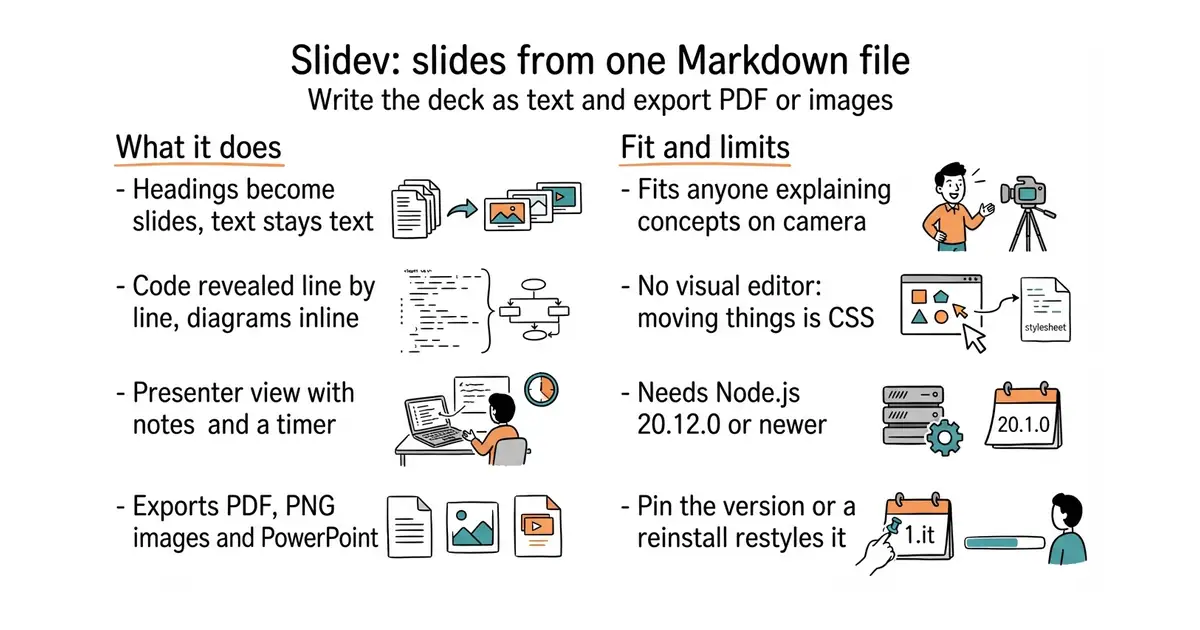
You write one Markdown file, with slides separated by a line of three dashes. Headings, lists and images work as they do anywhere else in Markdown. Code blocks are highlighted and can be revealed a line at a time, and Mermaid diagrams are written inline as text. There is a presenter view, with notes, a timer, and a drawing layer for marking up a slide while talking. It runs a live preview in a browser while the file is edited. Export produces PDF, PNG images or PPTX, so one source becomes several things. Because it is built on Vue, a slide can hold a live component rather than a screenshot. What it does not do is offer a visual editor: there is no canvas and no dragging, and moving an element means writing CSS.
Why it matters
Who it suits. Anyone who explains ideas on camera or on stage and keeps rebuilding the same explanatory frames by hand in a screenshot tool. It suits a second language best of all, because a translated deck is an edited copy of a text file rather than an afternoon of re-layout. Skip it if the recording is entirely screen capture with no explanatory frames, because there is nothing for it to do. And skip it if slides are built by dragging boxes, because that is not what this is.
Verdict. Worth an evening, and the PDF export is the part that earns it twice: a short "how to read this screen" PDF is something a visitor will hand over an email address for. Two cautions. The version number is 53.0.0, which is the result of frequent releases rather than fifty-three rewrites, but it does mean a reinstall next year can restyle an old deck, so pin the version in each project. And it needs Node.js 20.12.0 or newer, which the README states plainly. Code landed on 16 September 2026, the same day as the newest release. If one source file should produce slides, a web page and a PDF article all at once, quarto-dev/quarto-cli is the wider tool.
Summary (Key Points)from the README
Key features
- Markdown-based: Write slides in Markdown and use whatever editor you prefer.
- Developer friendly: Built-in code highlighting and live coding.
- Themable: Themes can be shared and used as npm packages.
- Interactive: Vue components can be embedded directly in slides.
- Presenter mode: Control slides from another window or from your phone.
- Drawing and LaTeX: Draw and annotate on slides, and render LaTeX math equations.
- Diagrams and icons: Create diagrams from text descriptions with Mermaid, and access icons from any icon set.
- Recording and export: Built-in recording with camera view, plus export to PDF, PNGs, or PPTX.
- Fast and hackable: Instant reloading powered by Vite, extensible with Vite plugins, Vue components, or npm packages.
Ways to install
| Platform or method | What it needs | Effort |
|---|---|---|
| Try it online (sli.dev/new) | Opening the sli.dev/new link | Minimal |
| Init project locally | Node.js 22.12.0 or newer | Moderate: install Node.js, then run the setup command |
Important
- Node.js version: Local setup requires Node.js >= 22.12.0.
- Command not shown: The README mentions a setup command but the command text is not included, so check the documentation for it.
- Export details: The README lists PDF, PNG, and PPTX export but gives no detail on output fidelity.
- Documentation language: Docs are available in English, Chinese, French, Spanish, Russian, and Brazilian Portuguese.
- License: MIT License, © 2021 Anthony Fu.
Written by an AI model from the project’s README; not part of the review, and it can be wrong.
- The deck is a text file, so a translation, a typo fix or a restructure is an edit rather than a redesign.
- Exports to PDF, PNG and PPTX, so one source produces a deck, a set of images and a document.
- MIT licence, 48,858 stars, 186 open issues, and a release on 16 September 2026.
- No visual editor: nudging an element means writing CSS, not dragging it.
- Needs Node.js 20.12.0 or newer, and releases come often enough that an unpinned version can restyle an old deck.
- Pointless for a video that is pure screen recording, so it only pays off where concepts are explained.
A Node project on your Mac, one folder per video, checked into Git beside the scripts.
npm init slidev@latest
cd slidev-deck
npm run dev        # live preview at localhost:3030
npm run export     # PDF