1.4k stars · MIT · 3.9.0 (2026-06-20) · Track this in Rising ↗
PostgreSQL-backed task queue for Python — the background worker four editions of product advice quietly assumed he already had.
Radar check
What we found when we opened it. Every bar is one fact, with its date.
Last code pushed 26 Oct 2026, one day before this check.
Latest release 3.10.0 on 23 Sep 2026.
Public since February 2019, a little over 7 years.
1,435 stars and 114 forks.
103 commits and 5 new issues in the last 90 days.
81 contributors. 36 pull requests merged in 90 days.
No security policy file says how to report a problem. No published security advisories.
How the bars are scored
- Alive. Days since the last code push: a week or less 100, a month 90, three months 70, six months 50, a year 30, eighteen months 15, older 0.
- Releases. Age of the latest GitHub release, on a similar scale; no bar when the project publishes no releases.
- Maturity. Age of the project: eight years 100, five 90, three 70, two 55, one 40, six months 25, younger 10.
- Adoption. Stars on a log scale: 100,000 stars is 100, 10,000 is 80, 1,000 is 60, 100 is 40.
- Activity. Commits in the last 90 days: 300 or more 100, 100 85, 30 65, 10 45, any 25.
- Community. People who have contributed: 100 or more 100, 30 80, 10 60, 5 40, 2 25, one 10.
- Security. A published security policy 80, none 40; published advisories are listed, not scored.
Checked by Repo Radar on 27 Oct 2026 from the repository on GitHub. Covered in Edition 5.
▶Repo detailsthe review · specs · pros & cons · install
What it does
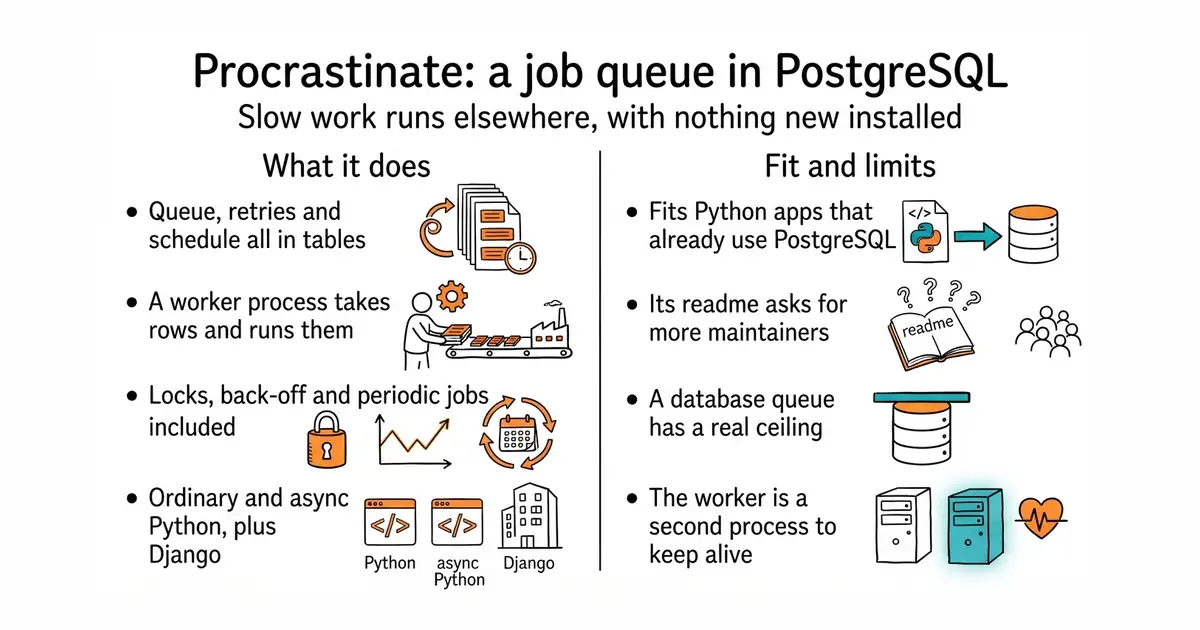
You declare a function as a task, and calling it puts a row in a table instead of running it. A separate worker process takes rows and runs them. Everything lives in PostgreSQL: the queue, the job state, the retries, the schedule and the notification that wakes a sleeping worker. It supports retries with back-off, locks so that two jobs cannot touch the same thing at once, jobs scheduled for a future time, and periodic jobs that run on a timetable. It works in both ordinary and async Python, and it has a Django integration. It needs Python 3.10 or newer and PostgreSQL 13 or newer. What it does not do is scale without limit: a database used as a queue has a real ceiling, which most projects never approach, and the README says the project is "looking for additional maintainers!".
Why it matters
Who it suits. Any Python web application that already has PostgreSQL and now needs something to run slow work. Document parsing, model training, long calculations and nightly jobs all belong here, and none of them can run inside a web request. It suits anyone who would rather not add a second data store, because one database dump still captures the whole system. Skip it if the job rate is in the thousands per second, where a purpose-built broker belongs. And skip it if the application is not Python.
Verdict. Worth half a day, and the quiet gem of this edition at 1,415 stars. The reason to choose this over the better-known alternative is the same reason a database extension often beats a separate search service: there is no second thing to secure, patch and back up. Three things to weigh honestly. The README asks for additional maintainers, which is the project saying out loud that the team is small — mature, well documented code with few hands on it, which is a real consideration for something load-bearing. The worker is a second process to keep alive, so a service file or a container is part of the job. And PostgreSQL as a queue has a ceiling; most projects are nowhere near it, and it is not the right tool at very high rates. In excellent health otherwise: a release on 23 September 2026 and code landing on 12 October 2026, the day of this refresh. celery/celery is the large alternative and wants a separate broker.
Summary (Key Points)from the README
Key features
- Python and database versions: Runs on Python 3.10+ and stores task definitions, manages locks and dispatches tasks through PostgreSQL 13+.
- Sync and async support: Works in both synchronous and asynchronous code, and the README recommends the async style.
- Django integration: Includes built-in integration for Django projects.
- ASGI compatibility: Fits easily into ASGI frameworks.
- Periodic tasks: Schedules tasks to run repeatedly on a timetable.
- Retries: Retries failed tasks.
- Arbitrary task locks: Lets you define custom locks on tasks.
- Deferred execution: Calling a task schedules it to run elsewhere, either now or later, rather than running it on the spot.
Important
- Maintainers wanted: The project states it is looking for additional maintainers, so long-term support may depend on new contributors.
- PostgreSQL requirement: You need a PostgreSQL 13+ database, because it is the storage and dispatch backbone.
- Incomplete README: The README points to external docs for the full feature set, so details such as configuration and deployment are not covered here.
Written by an AI model from the project’s README; not part of the review, and it can be wrong.
- No new infrastructure at all: the queue is tables in a PostgreSQL database that is already backed up.
- Retries, locks, scheduled and periodic jobs are included, so hand-written cron scripts are not needed.
- Works in both ordinary and async Python, has a Django integration, and is small enough to read end to end.
- The README asks for additional maintainers, which means a small team behind code that would be load-bearing.
- A database used as a queue has a genuine ceiling, so it is the wrong tool at very high job rates.
- The worker is a second process to keep running, which means a service file or a container to look after.
Install into the FastAPI virtual environment, run its migration against your existing PostgreSQL, and start one worker process beside the API.
python3 -m venv venv
source venv/bin/activate
pip install procrastinate
procrastinate schema --apply            # creates its tables in the database
procrastinate --app=myapp.app worker    # the worker process