In simple English
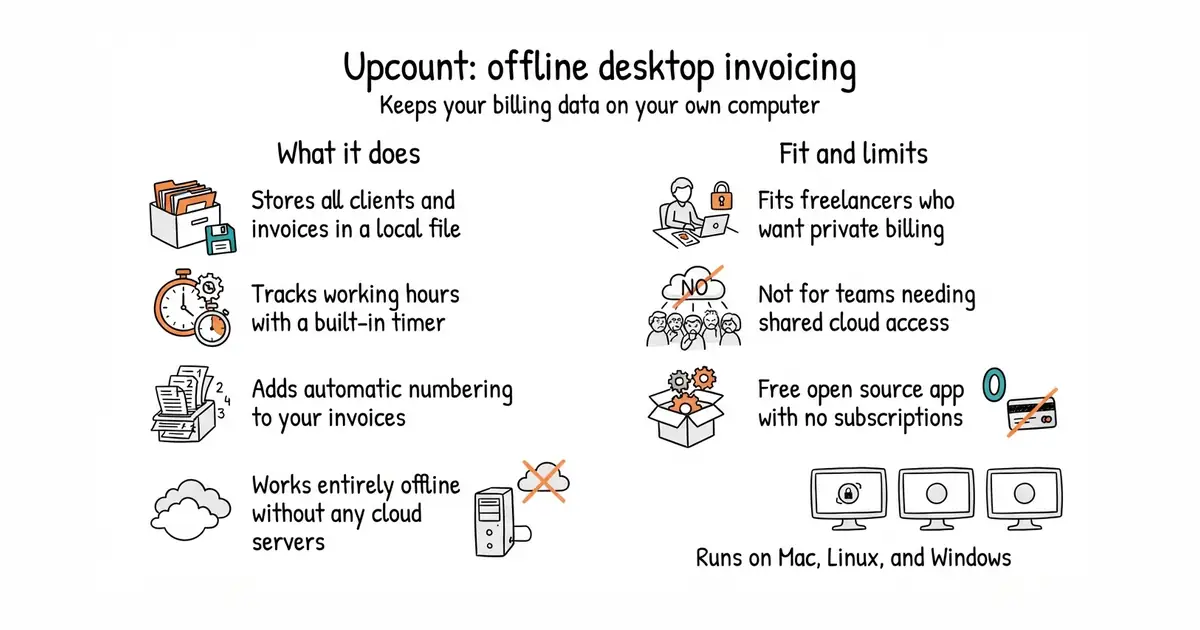
This app lets you create and send invoices from your computer without an internet connection. It keeps all your client records and business files stored safely on your own hard drive. There are no monthly fees, no cloud servers, and no hidden charges. You just download the program and start billing your clients directly.
What it is
Upcount is a desktop application built for freelancers and small business owners who want complete privacy over their financial data. It combines invoicing, time tracking, and client management into one simple package.
What it is good for
Solo builders and freelancers who want to manage clients, track working hours, and send invoices without paying for a cloud subscription or trusting an outside company with their financial records.
- Stores all your data locally on your computer in an SQLite (a small, self-contained database engine that lives in a single file) database.
- Includes built-in time tracking so you can turn billable hours directly into an invoice.
- Comes completely free and open source with no subscription fees.
- Requires manual download and installation from GitHub releases since it is a desktop program.
- Depends on your own local backups to prevent data loss if your computer breaks.
- Lacks built-in payment gateway integrations for online card payments on invoices.
Paid cloud invoicing services and spreadsheets
A PDF reader
- invoiceninja/invoiceninja10k stars
Invoice Ninja is a feature-rich invoicing platform, but it is primarily designed to run as a web server rather than a simple offline desktop app.
- nocodb/nocodb65k stars
NocoDB lets you build custom spreadsheets and tables, but you have to set up your own invoicing templates manually.


- btcpayserver/btcpayserver7.8k stars
Payment software you run yourself that takes Bitcoin into a wallet whose keys you hold.
- hledgerorg/hledger4.8k stars
Double-entry accounting over plain text files, with command-line, terminal, web and editor interfaces.
- akaunting/akaunting10k stars
Self-hosted invoicing and expense tracking, with the double-entry accounting sold separately as an add-on.
Download the installer for your operating system from the GitHub releases page at https://github.com/namespace-ee/upcount/releases.