3.9k stars · Apache-2.0 · lychee-v0.24.2 (2026-05-01) · Track this in Rising ↗
Fast link checker in Rust — ideal for CI on every deploy, including links inside Markdown docs.
Radar check
What we found when we opened it. Every bar is one fact, with its date.
Last code pushed 26 Oct 2026, one day before this check.
Latest release lychee-v0.24.2 on 1 May 2026.
Public since August 2020, a little over 6 years.
4,050 stars and 240 forks.
71 commits and 17 new issues in the last 90 days.
126 contributors. 36 pull requests merged in 90 days.
No security policy file says how to report a problem. No published security advisories.
How the bars are scored
- Alive. Days since the last code push: a week or less 100, a month 90, three months 70, six months 50, a year 30, eighteen months 15, older 0.
- Releases. Age of the latest GitHub release, on a similar scale; no bar when the project publishes no releases.
- Maturity. Age of the project: eight years 100, five 90, three 70, two 55, one 40, six months 25, younger 10.
- Adoption. Stars on a log scale: 100,000 stars is 100, 10,000 is 80, 1,000 is 60, 100 is 40.
- Activity. Commits in the last 90 days: 300 or more 100, 100 85, 30 65, 10 45, any 25.
- Community. People who have contributed: 100 or more 100, 30 80, 10 60, 5 40, 2 25, one 10.
- Security. A published security policy 80, none 40; published advisories are listed, not scored.
Checked by Repo Radar on 26 Oct 2026 from the repository on GitHub. Covered in Edition 17.
▶Repo detailsthe review · specs · pros & cons · install
What it does
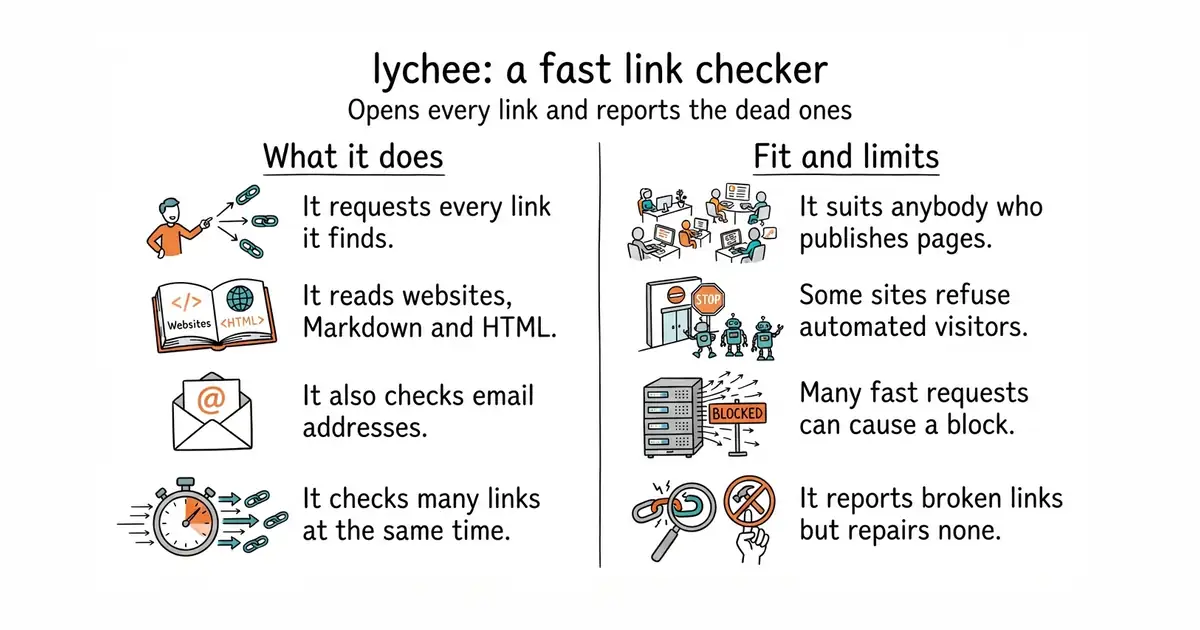
It finds the links in whatever you point it at and requests each one. It reads websites, Markdown files, HTML files, reStructuredText and plain text, and it checks email addresses as well. It makes many requests at the same time, so a large site takes minutes rather than hours. It can be told to ignore certain addresses, to accept certain error codes, and to retry. It runs as a command and also as a prepared Docker image, so Rust is not required. Version 0.24.2 is the newest release, from 1 May 2026, and code landed on 14 September 2026. It reports broken links; it does not repair them and it does not rewrite the pages.
Why it matters
Who it suits. Anybody who publishes pages. Broken links annoy readers, and search engines treat them as a sign that a site is not looked after. Running this weekly, or on every deploy, turns slow rot into a short list. Skip it if the site is a handful of pages that never change, because a manual check is faster than setting up a tool.
Verdict. Worth the ten minutes, with one caveat to plan for. Some sites block automated visitors, so a first run on a large site returns false alarms that have to be judged and then added to an ignore list. Budget an hour for that once, not every week. Use tcort/markdown-link-check if the only thing you need checked is Markdown.
Summary (Key Points)from the README
Key features
- Async, stream-based checking: Written in Rust and built to check links in parallel.
- Multiple targets: Checks websites, Markdown, HTML, CSS, XML and text files, and also finds broken mail addresses.
- Fallback extraction: Unknown formats are parsed in a best-effort plain-text mode, and `--preprocess` can convert formats such as PDF, EPUB or DOCX first.
- File selection: Accepts file globbing, and `--files-from` reads a list of paths from a file or stdin.
- Link filtering: Include and exclude regex patterns, `--exclude-path`, a `.lycheeignore` file, and filtering by scheme.
- Rate-limit handling: Per-host throttling, respect for rate limits, and retry with backoff.
- Caching: The `--cache` flag stores responses in `.lycheecache` so later runs can be faster.
- Output and config: Progress bar, colored output, quiet mode, JSON output, and a config file with a generated JSON schema for editor completion.
- Library and CI use: Usable as a Rust library, as a GitHub Action, and as a pre-commit hook that can check a whole repository.
- Exit codes: 0 for success, 1 for runtime or configuration errors, 2 when a link fails, and 3 for config file errors.
Ways to install
| Platform or method | What it needs | Effort |
|---|---|---|
| Arch Linux, OpenSUSE Tumbleweed, Ubuntu, Alpine Linux | The distribution's package manager | Low |
| macOS | Homebrew or MacPorts | Low |
| Docker | Docker; tags include latest, nightly, versioned, and -alpine variants | Low |
| Nix | Nix, using the provided flake | Low |
| FreeBSD, Termux, Conda | The respective package tooling | Low |
| Windows | Scoop, WinGet or Chocolatey | Low |
| Pre-built binaries | Download from the releases page (Linux, macOS, Windows) | Low |
| cargo-binstall | cargo-binstall installed | Low |
| GitHub Actions | The lycheeverse/lychee-action workflow step | Low |
| Cargo (from source) | Rust toolchain plus build dependencies (APT-based systems have a listed install command) | Higher |
Important
- Email checking is on by default: The `email-check` feature is enabled unless you turn it off. The `check_example_domains` feature is needed to check example domains such as example.com.
- TLS backend: lychee has fully switched to Rustls and dropped OpenSSL support. The README asks users to report any negative effects.
- Rate limiting on GitHub: Set `GITHUB_TOKEN` or use `--github-token` to avoid rate limits. A personal access token with no extra permissions can check public repo links.
- Privacy default: lychee does not store any data on disk unless you use `--cache`.
- Non-text formats: Plain-text fallback is best-effort. Formats like PDF, EPUB, DOCX, CSV or ipynb need `--preprocess` to work well.
- Docker progress bar: The progress bar needs an interactive terminal, so the container must run with `-it`.
- Feature comparison: The README says its comparison with other tools is best-effort and may be outdated.
Written by an AI model from the project’s README; not part of the review, and it can be wrong.
- It checks a whole site rather than one page at a time.
- It understands Markdown, so documentation can be checked before it is published.
- Fast, because it checks many links at the same time.
- Some websites refuse automated visitors and answer with an error even though the link is fine. Expect false alarms on the first run.
- Checking a large site makes many requests quickly, which can get an address temporarily blocked by a service that is linked to often.
- Installing from source needs Rust. Docker, a way to run a program inside its own sealed box so it cannot touch anything else on the machine, avoids that.
# macOS:
brew install lychee
# With Docker, no installation at all:
docker run --init -it -v "$(pwd)":/input lycheeverse/lychee /input/README.md
# Check a live site:
lychee --verbose https://example.com