896 stars · MIT · v2.5.1 (2026-06-27) · Track this in Rising ↗
One command, one HTML report: broken links, redirects, titles, descriptions, image weight, response times.
Radar check
What we found when we opened it. Every bar is one fact, with its date.
Last code pushed 27 Sep 2026, 30 days before this check.
Latest release v2.5.1 on 27 Jun 2026.
Public since October 2023, about 3 years.
979 stars and 90 forks.
210 commits and 8 new issues in the last 90 days.
7 contributors. No pull requests merged in 90 days; changes go in directly. A small team carries it.
No security policy file says how to report a problem. No published security advisories.
How the bars are scored
- Alive. Days since the last code push: a week or less 100, a month 90, three months 70, six months 50, a year 30, eighteen months 15, older 0.
- Releases. Age of the latest GitHub release, on a similar scale; no bar when the project publishes no releases.
- Maturity. Age of the project: eight years 100, five 90, three 70, two 55, one 40, six months 25, younger 10.
- Adoption. Stars on a log scale: 100,000 stars is 100, 10,000 is 80, 1,000 is 60, 100 is 40.
- Activity. Commits in the last 90 days: 300 or more 100, 100 85, 30 65, 10 45, any 25.
- Community. People who have contributed: 100 or more 100, 30 80, 10 60, 5 40, 2 25, one 10.
- Security. A published security policy 80, none 40; published advisories are listed, not scored.
Checked by Repo Radar on 26 Oct 2026 from the repository on GitHub. Covered in Edition 7.
▶Repo detailsthe review · specs · pros & cons · install
What it does
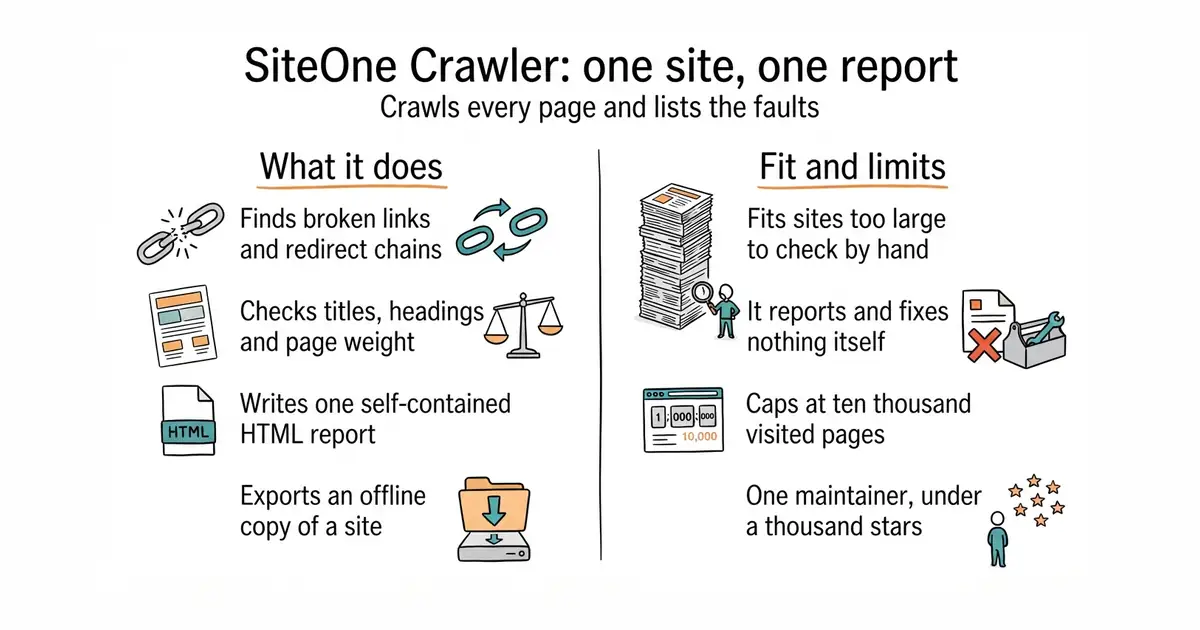
You give it a web address and it walks the site, recording every page and every asset with its status code, response time, size, headers and title. It can also start from a sitemap or a list of addresses instead of following links. It then reports on broken links, redirects, SEO, security headers, accessibility and performance, and gives a score out of ten in five categories. The output can be a self-contained HTML report, JSON, or coloured text, and a built-in mailer can send the report by email. It also exports a working offline copy of a site, converts a site to Markdown files, generates sitemaps, runs a simple load test, and exits with a failure code when a quality threshold is missed, which is what makes it usable in an automated build. Pages that need JavaScript are rendered in Chromium when the browser option is used; since version 2.5.1 the browser support is in the ordinary downloaded binaries. Since first publication the project has been rewritten in Rust, and its own page claims 25% faster execution and 30% lower memory use than the previous version while producing identical output. What it does not do is fix anything, and in sitemap-only mode it does not discover links beyond that sitemap.
Why it matters
Who it suits. Anyone who looks after a site of more than a few dozen pages and has no idea how many of its links still work. It suits a documentation site particularly well, because missing titles and descriptions are exactly what stops pages being found. It also suits anyone who wants an archived copy of a site before a redesign, which is one command here. Skip it if the site is three pages long, because reading them is faster.
Verdict. Worth an hour, and the report is worth handing straight to whoever makes the fixes. The practical change since this edition first ran is the install: Homebrew and the Linux package repositories now carry it, so there is no longer any need to fetch a file from a releases page. Published limits are worth knowing before the first run: it defaults to three workers and ten requests a second, and it stops at 9,000 queued and 10,000 visited addresses, so a very large site needs those raised. The musl build, which is the one that runs on older Linux systems, is 50 to 80% slower during the export features. Edition 2 covered harlan-zw/unlighthouse, which answers one question well — how each page scores in a browser performance audit — and says nothing about dead links. Use lycheeverse/lychee instead if link checking on every deploy is all that is wanted.
Summary (Key Points)from the README
Key features
- Faster Rust rewrite: The move from PHP+Swoole to Rust gave 25% faster execution and 30% lower memory use, with identical output.
- Quality scoring: Scores run from 0.0 to 10.0 across five categories: Performance, SEO, Security, Accessibility and Best Practices.
- CI quality gate: The `--ci` flag exits with code 10 when thresholds fail, so pipelines can block a deployment.
- Three report formats: An interactive HTML report, structured JSON and colored terminal text, with optional emailing of the HTML report via a built-in SMTP mailer.
- Offline and Markdown export: Sites can be cloned to browsable local HTML or converted to Markdown, including a single-file version for feeding AI tools.
- Interactive wizard: Running the binary with no arguments opens a wizard with 11 preset modes and shows the equivalent CLI command.
- Load testing: `--workers` (default 3) and `--max-reqs-per-sec` (default 10) control concurrency and request rate, and the same tool can warm caches.
- Technology detection: The Technologies table lists the stack a site reveals, found passively from headers, cookies, script URLs and HTML markers.
- Optional browser rendering: `--browser` renders pages in Chromium so JavaScript-driven sites are crawled with their post-render DOM, with screenshots and console diagnostics.
Ways to install
| Platform or method | What it needs | Effort |
|---|---|---|
| Pre-built binaries (Linux, Windows, macOS, x64 and arm64) | Nothing; the binary is self-contained | Low |
| Homebrew | macOS or Linux with Homebrew | Low |
| Debian / Ubuntu (apt) | Debian or Ubuntu; glibc 2.39+ or the static variant on older systems | Low |
| Fedora / RHEL (dnf) | Fedora or RHEL; the static package on older systems | Low |
| openSUSE / SLES (zypper) | openSUSE or SLES; the static package on older systems | Low |
| Alpine Linux (apk) | Alpine Linux | Low |
| Build from source | Rust 1.94 or later | Higher |
Important
- Linux variant trade-off: The musl build runs on any distribution but is about 50–80% slower, mainly in offline and Markdown exports; the glibc build needs glibc 2.39+.
- macOS launch issue: If Mac refuses to start the crawler from Downloads, move the whole folder elsewhere, such as your home folder.
- Worker limits: A high `--workers` value can cause a denial-of-service effect on the target server, so use it carefully.
- Browser mode limits: Auth, custom headers and cookies are not forwarded to the browser, and each rendered HTML page is fetched twice.
- Browser auto-download: The auto-download of chrome-headless-shell trusts Google's CDN over TLS.
- No-sandbox option: `--browser-no-sandbox` is often needed in Docker or CI but weakens isolation.
- MP4 output: MP4 animations require an external ffmpeg; GIF works without it.
- Cookie banner hiding: This is best-effort, and the accept-all fallback may grant consent where no reject control exists, so it is not a privacy tool.
- URL list scope: Listed URLs skip robots.txt and include/ignore regex rules and may point to any host.
- AI is opt-in: AI features run only with an `--ai-*` flag and can incur provider costs; `--ai-dry-run` previews cost.
- Authenticated caching: Responses fetched with credentials are cached unless `--http-cache-dir=` is set empty.
Written by an AI model from the project’s README; not part of the review, and it can be wrong.
- MIT licensed, a single program with no runtime to install, on macOS, Linux and Windows.
- One pass covers the unglamorous checks: broken links, redirect chains, titles, descriptions, image weight, response times.
- The offline export, the Markdown export and the sitemap generator are genuinely useful side effects.
- Fewer than a thousand stars and essentially one maintainer, so it is a tool to run rather than a dependency to build on.
- It reports and fixes nothing; the report is worth only the time spent acting on it.
- The queue caps and the three-worker default have to be raised by hand for a large site, and the musl build is much slower on the export features.
brew install janreges/tap/siteone-crawler