In simple English
When you build an app, you often need a notification bell for your users. This tool gives you a ready-made inbox widget and a server to back it. It tracks unread messages, lets users archive items, and sends live updates without reloading. You run one program on your own server alongside a database. It costs you nothing in money, but you must host and maintain the software yourself.
What it is
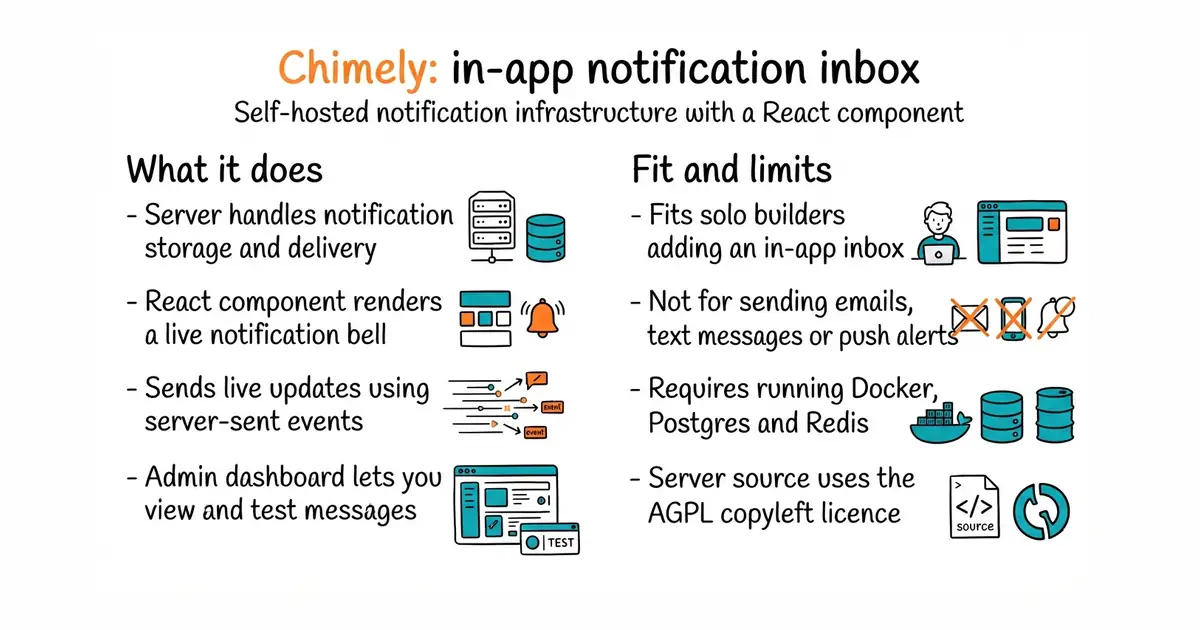
Chimely is an open-source notification inbox service built in Rust (a programming language known for speed and low memory use). It consists of a backend binary that talks to PostgreSQL (a system for storing data in tables) and Redis (a fast, temporary memory store), paired with a React component for your frontend.
What it is good for
Solo builders who want to add a polished notification bell and dropdown inbox to their web application without writing the backend logic from scratch.
- Comes with a ready-to-use React component featuring infinite scroll and read states.
- Sends live updates efficiently using Server-Sent Events (a way for a server to push updates to a browser).
- Includes an admin dashboard built right into the server for managing subscribers and messages.
- Server is licensed under AGPL-3.0 (a copyleft licence requiring you to share changes if you modify and network-host the server).
- Fails fast and will not start if the database is unreachable, requiring proper container restart policies.
- Pre-1.0 software, meaning the API and component interfaces may change in minor updates.
building a custom notification database table, polling API endpoints, and writing frontend dropdown state machines from scratch
PostgreSQL
- LimeSurvey/LimeSurvey3.7k stars
Survey software you install yourself, with around thirty question types and twenty years behind it.
- containrrr/shoutrrr1.7k stars
Sends a notification to any of about twenty services from a single line of text.
- botpress/botpress15k stars
The command-line tool, software kit and integrations for the Botpress cloud service, rather than a chatbot you host.
docker network create chimely

docker run -d --name chimely-pg --network chimely \
  -e POSTGRES_PASSWORD=chimely postgres:16-alpine

docker run -d --name chimely --network chimely -p 8080:8080 \
  --restart unless-stopped \
  -e DATABASE_URL=postgres://postgres:chimely@chimely-pg:5432/postgres \
  -e CHIMELY_DEV_ENVIRONMENT=demo \
  -e CHIMELY_DEV_API_KEY=dev-secret-key \
  ghcr.io/dodopayments/chimely:0.2.1