In simple English
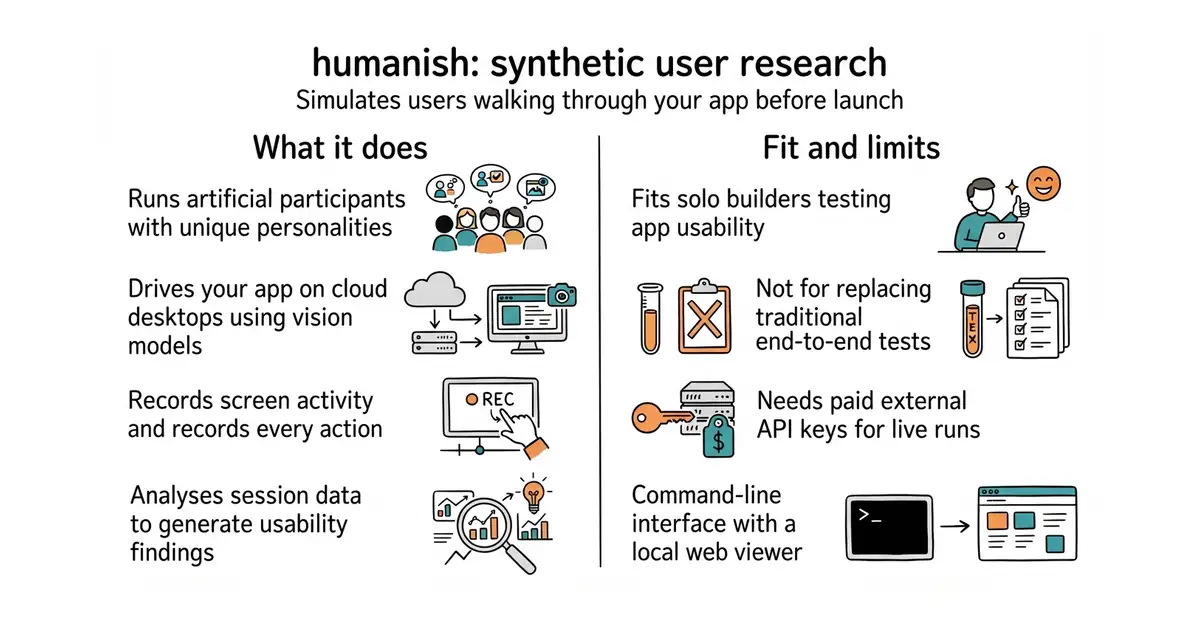
This tool creates artificial users that test your website or app automatically. Each artificial user gets a specific personality, like a hurried shopper or a cautious beginner. They click around a hosted desktop environment while an artificial intelligence reads the screen and makes decisions. You can watch a video replay of their session to see where they get confused or stuck. It requires paid artificial intelligence keys and setup time to run live tests.
What it is
A TypeScript command-line tool that runs synthetic user research studies using computer-use models and cloud desktops. It simulates user behavior, records their screens, analyses where they struggle, and outputs verification reports.
What it is good for
Solo builders who want to test their web applications for usability issues and frustrating design quirks without hiring human testers.
- Provides video replays and step-by-step traces of how artificial users interact with your app.
- Includes automated analysis that turns recorded session data into actionable bug reports.
- Includes a dry-run mode that lets you test study configuration files without spending money on API calls.
- Requires paid external API keys for cloud desktops and vision models to run live tests.
- Setup requires configuring Node.js 22, cloud desktop credentials, and study YAML files.
- The tool is in early development with a 0.x version number, meaning breaking changes can happen in minor updates.
manual usability testing with human participants
playwright
- microsoft/playwright98k stars
Automates browser actions through scripted tests rather than autonomous artificial intelligence personas.
- puppeteer/puppeteer96k stars
Controls browsers programmatically for testing and scraping instead of simulating user behaviour.


- unocss/unocss19k stars
A styling engine that reads the labels in your markup and generates only the CSS those labels need.
- HypothesisWorks/hypothesis9.1k stars
A Python library that generates test inputs and reduces any failure to the smallest example that still fails.
npm install --save-dev humanish
npx humanish init --yes
npx humanish run first-run