61.5k stars · Apache-2.0 · v4.3.17 (2026-09-04) · Track this in Rising ↗
Self-hosted Heroku for a single server — push-to-deploy, automatic HTTPS, scheduled Postgres backups from a UI.
Radar check
What we found when we opened it. Every bar is one fact, with its date.
Last code pushed 25 Oct 2026, 2 days before this check.
Latest release v4.5.0 on 23 Oct 2026.
Public since January 2021, a little over 5 years.
64,211 stars and 5,774 forks.
1,897 commits and 378 new issues in the last 90 days.
767 contributors. 393 pull requests merged in 90 days.
A security policy says how to report a problem. 70 published security advisories.
How the bars are scored
- Alive. Days since the last code push: a week or less 100, a month 90, three months 70, six months 50, a year 30, eighteen months 15, older 0.
- Releases. Age of the latest GitHub release, on a similar scale; no bar when the project publishes no releases.
- Maturity. Age of the project: eight years 100, five 90, three 70, two 55, one 40, six months 25, younger 10.
- Adoption. Stars on a log scale: 100,000 stars is 100, 10,000 is 80, 1,000 is 60, 100 is 40.
- Activity. Commits in the last 90 days: 300 or more 100, 100 85, 30 65, 10 45, any 25.
- Community. People who have contributed: 100 or more 100, 30 80, 10 60, 5 40, 2 25, one 10.
- Security. A published security policy 80, none 40; published advisories are listed, not scored.
Checked by Repo Radar on 25 Oct 2026 from the repository on GitHub. Covered in Edition 3.
▶Repo detailsthe review · specs · pros & cons · install
What it does
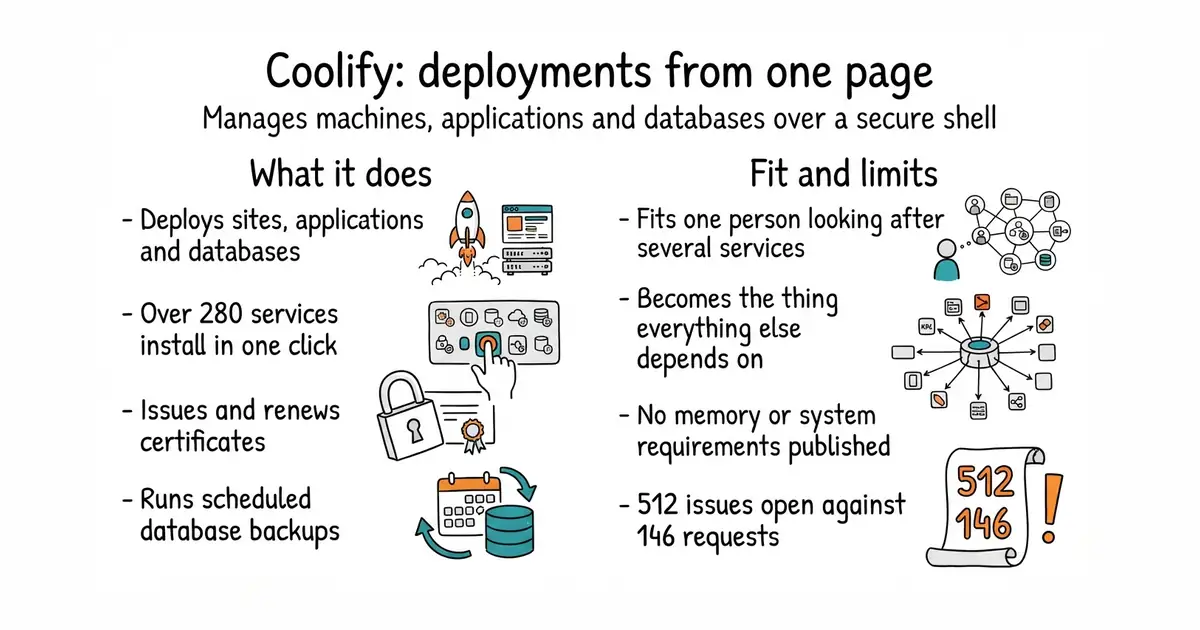
You install it on a Linux machine and connect the machines it should manage. The README says all it needs is a secure shell connection, and it names rented servers, bare metal and small home computers as equally fine. From the web interface it deploys static sites, applications from a code repository, and databases, and the repository description counts more than 280 services installable in one click. It issues and renews certificates, shows logs, holds settings, and runs scheduled database backups. The project is explicit about one design choice that matters: configurations for the applications and databases it manages are stored on the machine itself, so if you stop using this you can keep running what it set up. There is a paid hosted version for anyone who does not want to run the manager. What it does not do is publish its own requirements on the repository page: there is no memory figure, no processor figure and no list of supported Linux versions there, and the README sends you to its documentation site for all of it.
Why it matters
Who it suits. Anyone looking after a handful of services alone, who would rather spend the time on the work than on certificate renewals and backup scripts. The scheduled backups are the part that pays for itself, because they are the job people skip until the day it matters. It also suits anyone who wants a deployment button without handing the hosting to a company. Skip it if you run one program on one machine, because a manager is then more moving parts than the thing it manages.
Verdict. Worth a weekend, with one rule: do not move the most important thing into it first. The honest caveat is that it becomes a single point of failure, so the right first step is to put the next thing you deploy behind it, live with that for a fortnight, and move anything you care about only once it has earned the trust. At 62,584 stars this is the second most popular project in the edition, and it is moving quickly: release 4.4.6 on 9 October 2026 and code on 4 October 2026, with 16,799 commits behind it. Two more things to know. The recommended arrangement is one machine for the manager and separate machines for what it deploys, which is a second rental rather than a free lunch. And 512 issues are open against 146 pull requests, which for a program that holds the keys to everything is worth a look before you commit. If you want something smaller, dokku/dokku is the long-established command-line version of this idea.
Summary (Key Points)from the README
Key features
- Flexible deployment sources: Build from GitHub, GitLab, Bitbucket, or Gitea using Nixpacks, Railpack, Dockerfile, Docker Compose, or a prebuilt Docker image.
- Databases and one-click services: Deploy managed databases and more than 360 one-click services, each with persistent storage and generated credentials.
- Automated deployments: Deploy on every Git push, create pull-request previews, call deployment webhooks, and roll back to retained application images.
- Networking and HTTPS: Configure custom domains, automatic HTTPS certificates, reverse proxies, health checks, and container networks.
- Multi-server operations: Manage several servers, inspect deployment and runtime logs, open container terminals, and monitor resource status.
- Backups and automation: Set up database and storage backups, scheduled tasks, environment variables, secrets, and notifications.
- Multiple interfaces: Work through the dashboard, API, CLI, or MCP, with team-based access controls.
- Survives after removal: Your configurations stay on your servers, and running resources keep working if you stop using Coolify.
Ways to install
| Platform or method | What it needs | Effort |
|---|---|---|
| Self-hosted on your own server | A supported server that accepts SSH connections, such as a VPS, bare-metal server, or Raspberry Pi, plus the installation guide's requirements | Run one install command; you maintain the Coolify server |
| Coolify Cloud (hosted by the project) | No server of your own for Coolify; a paid subscription | Minimal; the team maintains the instance |
Important
- SSH requirement: Coolify manages servers through SSH, so every target server must accept SSH connections.
- Supported servers only: The one-line install works on a supported server; check the installation guide for requirements before running it.
- Review the script first: The README suggests reading the installation script before you run it.
- Recommended layout: Use one server for Coolify and one or more separate servers for deployed resources.
- Cloud is paid: Coolify Cloud is a paid service with email notifications and extra support; current pricing is listed at coolify.io and may change.
Written by an AI model from the project’s README; not part of the review, and it can be wrong.
- Scheduled database and volume backups from a web page, which is the chore most people skip.
- Certificate renewal across every service it manages, which removes a whole class of outage.
- What it deploys keeps its configuration on the machine, so leaving the platform does not strand the services.
- It becomes a single point of failure: if the manager breaks, everything it manages is harder to reach.
- The repository page publishes no memory, processor or operating-system requirements at all.
- 512 open issues against 146 pull requests, and the recommended layout needs a second machine for the manager itself.
curl -fsSL https://cdn.coollabs.io/coolify/install.sh | bash