2.1k stars · MIT · v3.4.1 (2025-12-15) · Track this in Rising ↗
A Cloudflare Worker plus one Analytics Engine binding — the cheapest analytics service you can run this year.
Radar check
What we found when we opened it. Every bar is one fact, with its date.
Last code pushed 4 Oct 2026, 23 days before this check.
Latest release v3.4.1 on 15 Dec 2025.
Public since December 2023, a little over 2 years.
2,170 stars and 137 forks.
11 commits and 3 new issues in the last 90 days.
24 contributors. 11 pull requests merged in 90 days.
No security policy file says how to report a problem. No published security advisories.
How the bars are scored
- Alive. Days since the last code push: a week or less 100, a month 90, three months 70, six months 50, a year 30, eighteen months 15, older 0.
- Releases. Age of the latest GitHub release, on a similar scale; no bar when the project publishes no releases.
- Maturity. Age of the project: eight years 100, five 90, three 70, two 55, one 40, six months 25, younger 10.
- Adoption. Stars on a log scale: 100,000 stars is 100, 10,000 is 80, 1,000 is 60, 100 is 40.
- Activity. Commits in the last 90 days: 300 or more 100, 100 85, 30 65, 10 45, any 25.
- Community. People who have contributed: 100 or more 100, 30 80, 10 60, 5 40, 2 25, one 10.
- Security. A published security policy 80, none 40; published advisories are listed, not scored.
Checked by Repo Radar on 25 Oct 2026 from the repository on GitHub. Covered in Edition 9.
▶Repo detailsthe review · specs · pros & cons · install
What it does
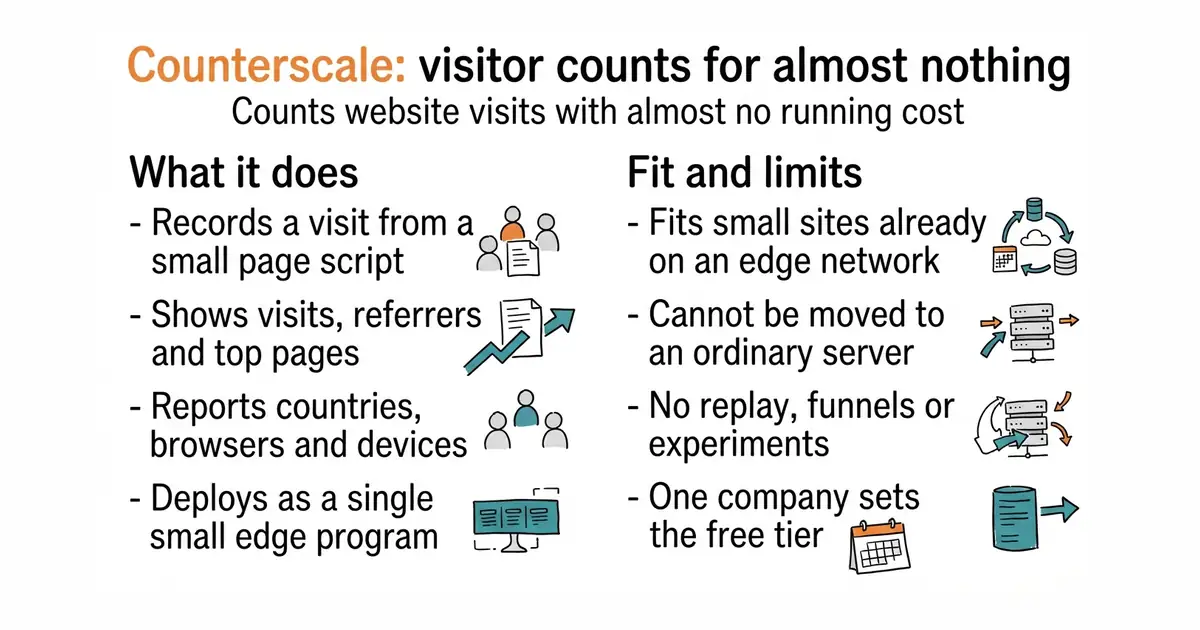
Counterscale records a visit when a small script on the page reports it. The data goes into Cloudflare's Analytics Engine, a time-series store that is part of the same platform. A dashboard shows visits, page views, referring sites, top pages, countries, browsers and device types, over a chosen period. Everything deploys as one Cloudflare Worker, which is a small program that runs on Cloudflare's edge network rather than on a server. The free tier covers a small site's traffic, so the running cost is usually nothing. It does not record individual visits for playback, it does not do funnels or experiments, and it cannot run anywhere except Cloudflare.
Why it matters
Who it suits. Anyone already using Cloudflare in front of a website who wants visitor numbers without a monthly bill and without sending the data to an advertising company. It is also a good first analytics tool for a side project, because there is nothing to maintain. Skip it if Cloudflare is not already in the picture, because adding a whole network layer for a visit counter is the wrong order of work.
Verdict. The cheapest honest answer to "how many people came" that exists this year, with two real caveats. It only runs on one company's platform, and that company sets the free tier, so this is a convenience with a dependency attached. Note also that the newest tagged release is v3.4.1 from December 2025, while code landed on 4 October 2026 — the project is active, it just tags rarely. Umami is the answer when the data must live on hardware you control.
Summary (Key Points)from the README
Key features
- Self-hosted on Cloudflare: Runs on Cloudflare Workers and Workers Analytics Engine, with no separate server to manage.
- Near-zero cost: Designed to cost little to run, with Cloudflare's free tier said to support up to 100k hits/day.
- Guided installer: A CLI installer deploys the app and asks for your API token and whether to password-protect the dashboard.
- Optional dashboard password: Authentication can be enabled or disabled, and the password can be rolled later with the `auth` command.
- Long-term storage: Data is kept beyond the 90-day window in an R2 bucket as Apache Arrow files. It is on by default and can be turned off through the CLI.
- Three tracking methods: Use a CDN script (`tracker.js`), an npm package for the browser, or a `/server` module for backend tracking.
- Manual pageview control: Setting `autoTrackPageviews` to false lets you call `trackPageview()` yourself.
- Custom domains: The deployment URL can be moved behind a domain you own.
- Semantic versioning: Routine upgrades only require re-running the installer, and existing data carries forward.
Ways to install
| Platform or method | What it needs | Effort |
|---|---|---|
| Script Loader (CDN) | A deployed Counterscale instance and one snippet pasted into your site's HTML | Copy and paste one snippet |
| Package/Module (npm) | The npm package, a site ID and the URL of your reporting endpoint | Install the package and call `init` with those values |
| Server-Side Module (`/server`) | The npm package, plus explicit URL and hostname on each call | Install the package and call `trackPageview` from your backend |
Important
- Data window: Workers Analytics Engine keeps data for at most 90 days, so the dashboard only shows the last 90 days unless long-term storage is enabled.
- Platform limits: The README lists only macOS or Linux as supported environments and requires Node v20 or above.
- Cloudflare account and beta feature: You need a Cloudflare account, and Analytics Engine must be enabled (it is described as a beta). A "Hello World" Worker must be created first if you have never used Workers.
- API token: Keep the token somewhere safe, because it cannot be viewed again once the window is closed.
- Public dashboard risk: If you decline password protection, the dashboard is publicly accessible without authentication.
- Activation delay: A new Worker subdomain can take a few minutes to go live, and the site may show "Secure Connection Failed" until then.
- Major version upgrades: Upgrades to a new major version may need extra steps, so check the release notes first.
- Local development: Writes are no-ops, so no hits are recorded locally, and reads come from the production dataset.
- Sampling: Cloudflare Analytics Engine samples high-volume data, so reported figures may be sampled estimates.
Written by an AI model from the project’s README; not part of the review, and it can be wrong.
- Genuinely free at small-site traffic on Cloudflare's own free tier
- Deploys as a single Worker, small enough to read and change
- Comes with a dashboard, not just a collector
- Runs only on Cloudflare; it cannot be moved to an ordinary server
- The free tier and the terms are set by one company and can change
- Effectively one maintainer, so expect slow answers to issues
Google Analytics, and the cost of running your own analytics box
Nothing on your server — deliberately separate infrastructure, so an outage on one does not take the other
npm create counterscale
cd my-counterscale
npm install
npx wrangler login
npm run deploy