39.6k stars · MIT, with a proprietary ee/ directory · desktop-v0.61.263 (2026-09-08) · Track this in Rising ↗
Analytics, session replay, feature flags, experiments and surveys behind one snippet — four standing recommendations collapsed into one.
Radar check
What we found when we opened it. Every bar is one fact, with its date.
Last code pushed 25 Oct 2026, 2 days before this check.
Latest release desktop-v0.61.839 on 24 Oct 2026.
Public since January 2020, a little over 6 years.
40,421 stars and 3,552 forks.
17,744 commits and 1553 new issues in the last 90 days.
596 contributors. 17619 pull requests merged in 90 days.
A security policy says how to report a problem. 1 published security advisory.
How the bars are scored
- Alive. Days since the last code push: a week or less 100, a month 90, three months 70, six months 50, a year 30, eighteen months 15, older 0.
- Releases. Age of the latest GitHub release, on a similar scale; no bar when the project publishes no releases.
- Maturity. Age of the project: eight years 100, five 90, three 70, two 55, one 40, six months 25, younger 10.
- Adoption. Stars on a log scale: 100,000 stars is 100, 10,000 is 80, 1,000 is 60, 100 is 40.
- Activity. Commits in the last 90 days: 300 or more 100, 100 85, 30 65, 10 45, any 25.
- Community. People who have contributed: 100 or more 100, 30 80, 10 60, 5 40, 2 25, one 10.
- Security. A published security policy 80, none 40; published advisories are listed, not scored.
Checked by Repo Radar on 25 Oct 2026 from the repository on GitHub. Covered in Edition 11.
▶Repo detailsthe review · specs · pros & cons · install
What it does
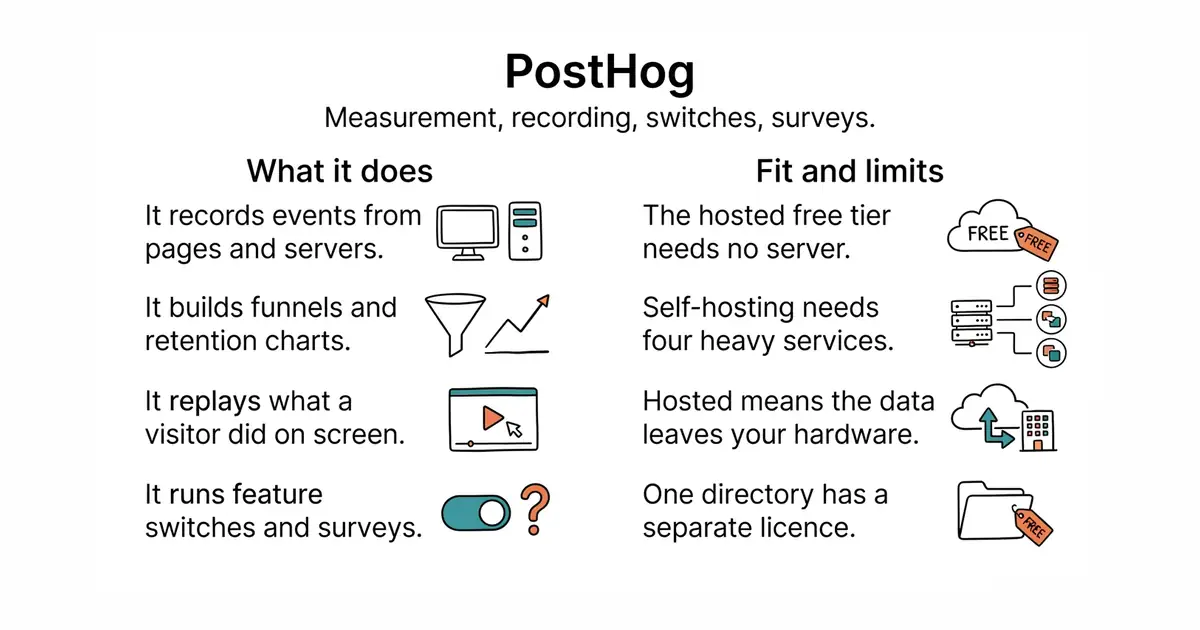
You add one script to a page, or a library to a server, and it records events: pages viewed, buttons pressed, steps completed. From those it builds funnels, which show where people drop out of a sequence, and retention charts. Session recording replays what a visitor actually did on screen. Feature switches turn a feature on for a chosen slice of users, and experiments compare two variants against a chosen measure. Surveys ask a question inside the product. Error tracking collects faults from the browser and the server. All of it reads the same event stream, so a session recording can be opened from the step in a funnel where somebody left. It is fully self-hostable. What it does not do is stay small when self-hosted: the full deployment wants ClickHouse, Kafka, PostgreSQL and Redis.
Why it matters
Who it suits. A small team that needs to know why people leave a particular screen and has nobody to spare for running four services. The single event stream is the real advantage: switches, surveys and recordings all refer to the same users, so a question asked in one place can be answered in another. Skip it if the only requirement is page counts, because a small measurement tool does that with far less weight and keeps the data on hardware you control.
Verdict. The clearest single decision on this page, and the recommendation is specifically the hosted free tier rather than the self-hosted build. You get an answer this evening instead of after a ClickHouse deployment. State the trade plainly though: hosted means visitor behaviour is sent to an American company instead of staying on hardware you control, which is the opposite of a privacy-first position and is exactly why entry 5 sits on this page beside it. The licence is MIT with one directory, ee, held under separate terms, so "open source" carries a footnote. It ships continuously: the newest tag, a desktop build, is dated 13 October 2026. matomo-org/matomo is the self-hosted alternative if keeping the data matters more than the feature set.
Summary (Key Points)from the README
Key features
- Product analytics: Autocapture or manually instrument event-based analytics, then analyze with visualizations or SQL.
- Session replay: Watch real user sessions on your website or mobile app, and let Replay Vision turn recordings into queryable observations.
- Error tracking and logs: Track errors with alerts, ingest and search logs, and follow distributed traces to the line of code that broke.
- Feature flags and experiments: Roll out features to select users or cohorts, and measure statistical impact on goal metrics, with no-code setup available.
- Surveys and support: Use no-code survey templates or a survey builder, plus a chat widget and unified support inbox beside product data.
- Data warehouse and pipelines: Get a managed warehouse with 120+ sources and a SQL editor, and send data to 25+ tools or any webhook in real time.
- AI observability: Capture traces, generations, latency, and cost for LLM apps, and run LLM-as-a-judge evaluations.
- Self-driving and PostHog AI: Turn product signals into researched reports and pull requests for review, and ask your data questions in plain language.
Ways to install
| Platform or method | What it needs | Effort |
|---|---|---|
| PostHog Cloud US or EU | A sign-up; no card required for the free tier | Lowest; the README calls it the fastest and most reliable start |
| Self-hosted hobby deploy | Linux with Docker, recommended 4GB memory | One line to deploy, per the README |
| Setup wizard | An existing PostHog instance | Installs and configures PostHog in your app for you |
| MCP server | An MCP-compatible client such as Claude Code, Cursor, Codex, VS Code, Zed, or PostHog Desktop | Connect the remote MCP server to the client |
Important
- Self-hosting limits: Open-source deployments should scale to about 100k events per month, after which the README recommends moving to PostHog Cloud.
- No support for self-hosting: The README says customer support and guarantees are not provided for open-source deployments.
- Usage-based pricing: The free tier has monthly limits (for example, 1 million events and 5k recordings), and you pay for usage beyond them.
- Licensing: The repo is MIT licensed, except the ee directory, which has its own license. A separate posthog-foss repository is offered for fully open-source needs.
Written by an AI model from the project’s README; not part of the review, and it can be wrong.
- Replaces four separate tools with one script, which is a decision as much as an installation.
- A large free hosted allowance, so the cost at low traffic is plausibly nothing.
- An MIT core, so moving to your own hardware later is a real option rather than a claim.
- Self-hosting means ClickHouse, Kafka, PostgreSQL and Redis, which is a project rather than an evening.
- One directory is held under separate terms, so the open-source description is not complete.
- Hosted means visitor data leaves your own machines, which contradicts a privacy-first story if that is the story being told.
The trade deserves stating plainly — you are sending visitor behaviour to a US company instead of keeping it on your own box, which is exactly the privacy position Umami and remark42 (Ed.
5 #1) were chosen for, and exactly why CookieConsent (#5) sits on this page beside it.
Nothing to install for the hosted route.