8.6k stars · Apache-2.0 · v6.2.1 (2026-08-26) · Track this in Rising ↗
~3 KB of JavaScript that measures Core Web Vitals on real visits — the field data behind Unlighthouse's and SiteOne's lab scores.
Radar check
What we found when we opened it. Every bar is one fact, with its date.
Last code pushed 16 Oct 2026, 11 days before this check.
No releases published on GitHub; the code date above is the one to trust.
Public since March 2020, a little over 6 years.
8,657 stars and 537 forks.
29 commits and 15 new issues in the last 90 days.
41 contributors. 14 pull requests merged in 90 days.
No security policy file says how to report a problem. No published security advisories.
How the bars are scored
- Alive. Days since the last code push: a week or less 100, a month 90, three months 70, six months 50, a year 30, eighteen months 15, older 0.
- Releases. Age of the latest GitHub release, on a similar scale; no bar when the project publishes no releases.
- Maturity. Age of the project: eight years 100, five 90, three 70, two 55, one 40, six months 25, younger 10.
- Adoption. Stars on a log scale: 100,000 stars is 100, 10,000 is 80, 1,000 is 60, 100 is 40.
- Activity. Commits in the last 90 days: 300 or more 100, 100 85, 30 65, 10 45, any 25.
- Community. People who have contributed: 100 or more 100, 30 80, 10 60, 5 40, 2 25, one 10.
- Security. A published security policy 80, none 40; published advisories are listed, not scored.
Checked by Repo Radar on 25 Oct 2026 from the repository on GitHub. Covered in Edition 8.
▶Repo detailsthe review · specs · pros & cons · install
What it does
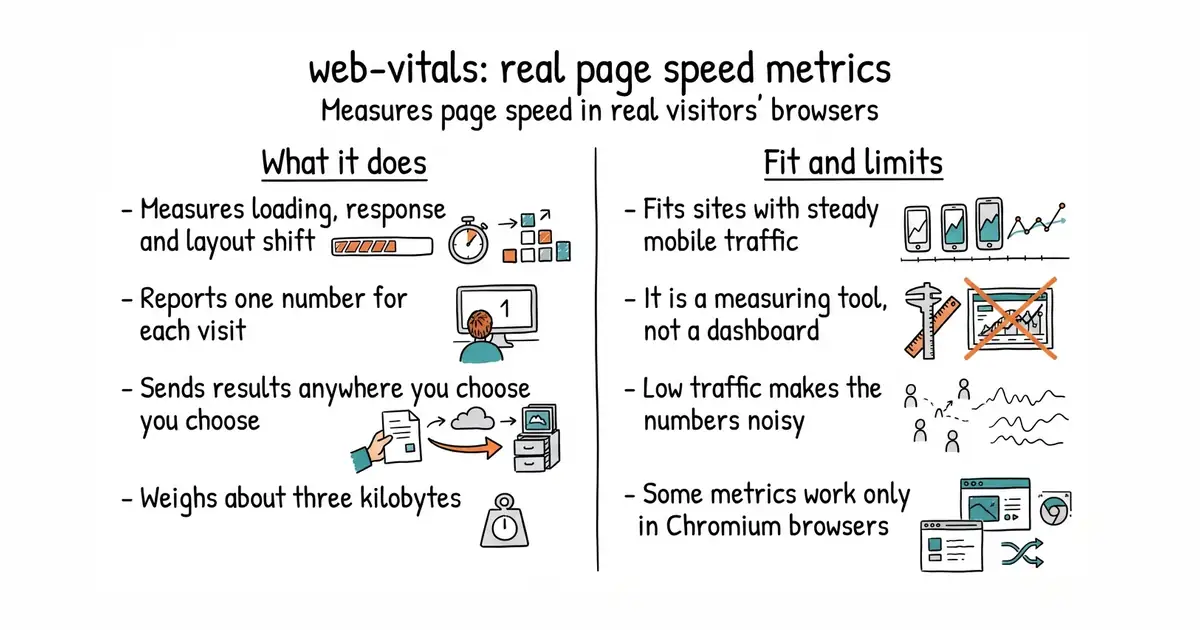
It measures Core Web Vitals, the handful of speed numbers Google uses in search ranking. Those are largest contentful paint, which is how long the main content takes to appear, interaction latency, which is how long a tap takes to respond, and layout shift, which is how much the page jumps about while loading. It reports one measurement per visit, as a plain number. You decide where it goes: an analytics event, an HTTP endpoint of your own, or a log line. The library is roughly 3 KB and loads without blocking the page. Version 6.2.3 is current on npm, and the Chrome team updates it as the metric definitions change. It does not store, chart or interpret anything, and it provides no dashboard.
Why it matters
Who it suits. Teams that have already made pages lighter and want to know whether it worked for real visitors on real phones. It suits a site where a large share of traffic arrives from a link on a phone, because that is where lab tests are most misleading. Skip it if the site gets a few hundred visits a month, because the numbers will be too noisy to act on.
Verdict. Install it, but only once something is ready to receive the numbers. On its own it produces measurements nobody reads. The honest sequence is a log or an analytics endpoint first, this second. Lighthouse and Unlighthouse answer the related question of what to fix, and they do it before launch rather than after.
Summary (Key Points)from the README
Key features
- Small footprint: The library is about 3K when brotli'd.
- Core Web Vitals coverage: It measures CLS, INP and LCP, plus FCP and TTFB.
- Deferred loading: The buffered flag for PerformanceObserver lets it read entries recorded before the library loaded, so it can be loaded after other user-impacting code.
- Attribution build: It adds an `attribution` property to each metric with diagnostic detail, at about 1.5K extra when brotli'd.
- Delta reporting: Each metric has an `id` and `delta`, so you can sum deltas for a metric when your analytics provider does not accept overwritten values.
- Soft navigation measurement: The `reportSoftNavs: true` option measures single-page-app soft navigations in Chromium 151+.
- Custom INP threshold: The `durationThreshold` option sets the event-timing filter. The default is 40 milliseconds after initialization, versus the 104 milliseconds that applies before it.
- Custom element targets: The attribution build's `generateTarget()` function lets you control how DOM elements are stringified in reports.
- Batching support: The README shows how to queue metric reports and flush them on visibility change to reduce network requests.
Ways to install
| Platform or method | What it needs | Effort |
|---|---|---|
| npm | npm and a build tool that handles imports | README's recommended route; integrates into your build process |
| CDN (unpkg.com, jsDelivr, cdnjs) | A page that loads script tags, with no npm | Script tags in module or classic form; README recommends self-hosting the built files instead |
Important
- Iframes are not measured: The APIs cannot see content inside iframes, including same-origin ones, so results can differ from the Chrome User Experience Report. On pages with iframes, `onCLS()` measures DCLS rather than CLS.
- Some callbacks never fire: INP is not reported without user interaction, and CLS, FCP and LCP are not reported if the page loaded in the background.
- Callbacks can fire more than once: CLS and INP report when the page becomes hidden, and all metrics report again after a back/forward cache restore, so you need delta handling.
- Avoid repeated setup: Each metric function creates a PerformanceObserver and listeners for the page's lifetime, so calling them repeatedly per page can increase memory use.
- reportAllChanges is for debugging: The README says it is not needed or recommended for production measurement.
- Soft navigation support is limited: Core Web Vitals for soft navigations require Chromium 151+. Other browsers keep the standard reporting.
- Browser support varies: The code is tested in Chrome, Firefox and Safari, but CLS is available only in Chromium.
- CDN caveat: unpkg.com, jsDelivr and cdnjs are not affiliated with Google, and the README gives no guarantee that CDN loading will keep working.
Written by an AI model from the project’s README; not part of the review, and it can be wrong.
- About 3 KB, loaded asynchronously, with no measurable cost to the page it measures.
- It sends to anything, so there is no vendor to sign up with.
- Maintained by the Chrome team and updated as the metric definitions change.
- It is a measuring tool and nothing else. Storing and charting the numbers is separate work.
- Field data is noisy at low traffic. One visitor on a train can move a monthly median.
- Some metrics are Chromium-only. Safari and Firefox report less, which skews an iPhone-heavy audience.
npm install web-vitals