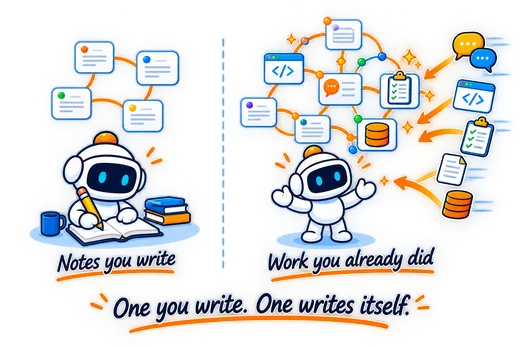
Manual knowledge management vs supervised AI development.

Obsidian is excellent for private notes, Markdown ownership, linked thinking, and flexible personal knowledge management. Grasppy is built for a different job: supervising the workflow around AI-assisted development.

Use Obsidian if it helps you think. Use Grasppy when AI development context needs to stay under control.

This is not an anti-Obsidian page.

Obsidian is a strong tool for people who want local-first notes, plain Markdown files, backlinks, graph view, Canvas, plugins, and a personal knowledge system they can shape themselves.

The problem starts when developers try to use that manual note system as the operating layer for Cursor, Claude Code, Codex, ChatGPT, research, plans, verification, documentation, rules, skills, and AI memory. It can work, but the developer becomes the workflow operator.

Grasppy is designed for that exact pressure point: the developer keeps building in their coding tools, while Grasppy captures the context, turns it into managed development cycles, verifies progress, and preserves memory for the next cycle.

Obsidian organizes what you write down. Grasppy captures what AI development produced.

Both can be useful. The difference is the starting point. Obsidian starts with notes. Grasppy starts with the AI conversations, decisions, plans, artifacts, research, docs, and memory changes created during development.

Obsidian

A flexible private thinking space for notes, links, documents, and personal knowledge systems.

  • + Local-first Markdown notes you own.
  • + Backlinks, graph view, Canvas, tags, and plugins.
  • + Excellent for deliberate writing and long-term notes.
  • ! AI development context must be summarized, linked, and maintained manually.

Grasppy

A supervised AI development workflow for builders using Cursor, Claude Code, Codex, ChatGPT, and other AI tools.

  • + Captures conversations and extracts decisions, artifacts, and unfinished work.
  • + Turns context and research into reviewable development plans.
  • + Verifies progress against the approved plan.
  • + Updates docs, skills, rules, and memory through a controlled cycle.

The same developer, two very different systems.

A Cursor-centered developer can use Obsidian as a manual vault. Grasppy is the supervised layer around the AI development workflow.

Manual Obsidian-style workflow

01
Build in Cursor or another AI tool

The real work happens in chats, agents, terminal output, docs, and code.

02
Remember what mattered

The developer decides which decisions, prompts, and tradeoffs are worth saving.

03
Copy notes manually

Important context is pasted or rewritten into Markdown files, folders, tags, or Canvas boards.

04
Maintain the system

Links, plans, rules, docs, checklists, and memory files need ongoing cleanup.

05
Reconstruct context later

The next AI session depends on how well the developer maintained the vault.

Grasppy supervised workflow

01
Capture conversations

AI sessions flow into Grasppy as development context, not forgotten chat history.

02
Extract decisions and artifacts

Plans, code snippets, docs, problems, and rationale become structured records.

03
Create and approve the plan

Context and research become a written plan the developer can review before building.

04
Build and verify

Work is checked against the approved plan, so missing steps become visible.

05
Update docs and memory

The cycle closes with reviewed documentation, memory, and next-session context.

The difference is not notes. The difference is maintenance burden.

These are qualitative workflow charts, not benchmark claims. They show where the human effort tends to go in each approach.

Manual upkeep

Obsidian setupHigh
Grasppy loopLower

AI workflow coverage

Obsidian setupManual
Grasppy loopEnd-to-end

Source traceability

Obsidian setupDepends
Grasppy loopBuilt in

Obsidian and Grasppy solve different jobs.

If you already love Obsidian, keep it. This table shows where Grasppy fits when your work depends on AI conversations and supervised development cycles.

Area Obsidian Grasppy What it means for developers
Primary job Private knowledge base and linked notes. Supervised AI development workflow. Obsidian helps you organize thinking. Grasppy helps you control the AI development cycle.
Starting input Notes, Markdown files, clippings, links, Canvas boards, and manually written project docs. AI conversations, decisions, artifacts, focused research, development plans, docs, rules, skills, and memory snapshots. Grasppy starts from the work AI already generated, not from a blank page.
Cursor workflow You can manually maintain project notes beside Cursor. Grasppy captures and structures the context around Cursor-driven development. The developer stays focused on building instead of maintaining a parallel vault.
Plans Plans can be written manually or managed through templates/plugins. Plans are created from captured conversations, decisions, and research, then reviewed before execution. The plan is connected to the actual development conversation that produced it.
Verification Usually handled with manual checklists, notes, issues, or external tools. Plan completeness can be reviewed against what was actually built. "Done" becomes something to verify, not just a feeling after the chat ends.
Documentation Great place to keep docs if the developer keeps them updated. Docs can be generated, imported, reviewed, and connected back to the workflow. The docs are part of the supervised cycle, not an afterthought.
AI memory You can maintain memory/rule notes manually and copy them into AI tools. Memory snapshots are reviewed, approved, and preserved for the next cycle. Memory changes are supervised instead of silently drifting.
Best fit Personal knowledge management, writing, research notes, long-term thinking, private Markdown vaults. AI-assisted software development where context, plans, verification, docs, and memory must stay connected. Use the right tool for the job. They can complement each other.

The strongest stack may include both.

Grasppy does not need to replace Obsidian. It can become the supervised workflow layer that feeds better, cleaner context into the places you already like.

Use Obsidian for thinking.

Keep your private notes, reading notes, personal wiki, daily notes, and long-term reflections in Obsidian if that system works for you.

Use Cursor for building.

Keep driving development in Cursor, Claude Code, Codex, GitHub, and your local tools. Grasppy is not trying to become your IDE.

Use Grasppy for supervision.

Let Grasppy manage the loop around AI development: capture, research, plan, build, verify, update docs, and preserve memory.

Obsidian is where you can write what you know. Grasppy is where AI development context becomes controlled workflow.

Short answers for Obsidian users.

Is Grasppy trying to replace Obsidian?

No. Obsidian is a strong notes and knowledge management tool. Grasppy is built for supervised AI development workflows, especially when the important context is produced across AI conversations, coding tools, research, plans, documentation, and memory.

Why not just use Obsidian templates and plugins?

You can, and many developers do. The problem is maintenance. Templates and plugins still depend on the developer to move AI conversations into the vault, summarize them, link them, update plans, verify completion, and maintain memory. Grasppy is designed to make those steps part of the workflow.

Who should choose Obsidian first?

Choose Obsidian first if your main need is private Markdown notes, writing, linked thinking, reading notes, or a personal knowledge base. It is excellent for that job.

Who should choose Grasppy first?

Choose Grasppy first if your main pain is losing AI development context: decisions buried in chats, plans disconnected from builds, stale docs, unclear memory, and no reliable way to carry context into the next cycle.

About the Obsidian side of this comparison.

The comparison is based on Obsidian's public product positioning and documentation, plus the developer workflow pattern of using notes and Markdown vaults around AI coding tools.

Obsidian overview - local notes, plugins, graph, Canvas, Sync, Publish, and product positioning.

Obsidian Sync - encrypted sync, version history, collaboration, and file recovery.

How Obsidian stores data - local vault and file model.

Keep your notes. Supervise your AI development.

Grasppy turns AI conversations into managed development cycles: capture, research, plan, build, verify, preserve memory.