Grasp what you build
The workspace around your AI coding tools.
Your AI writes faster than anyone can check it. Grasppy makes your plan a checklist the code must pass, keeps the reason behind every decision, and flags what a change will break. Build at full speed and still answer for the result.
The Problem
Generating code got cheap. Checking it did not. So the work moved — out of the editor and into reviewing, correcting and re-deciding things you thought were settled. It works for a few weeks. Then it is fifteen thousand lines nobody has read end to end, and you are no longer building — you are answering for a thing you cannot fully account for.
The code is there. The reasoning is not. Why this library and not that one, why the validation exists, what you already tried and rejected — it was in a conversation, and the conversation is gone. Six weeks later nobody can tell whether a decision was deliberate or accidental.
Two thousand lines arrive in four minutes and take the rest of the afternoon to read. It is fluent, it is confident, and it is almost right — which is harder to review than obviously wrong. The time you saved writing, you spend checking.
Not a memory failure — the instruction was right there and it went the other way. So you write the rule again, harder, in capitals. The file grows, the agent keeps overruling it, and one broken rule quietly becomes the precedent for the next session.
What imports this file? What breaks if I change this function? On a codebase you wrote by hand you knew. On one you built with AI you never did — and the assistant is guessing too.
The fix is not a better assistant, and it is not another folder. Grasping is a workflow — it has steps, and they run while the work happens. Not afterwards, when nobody has the time.
The Root Idea
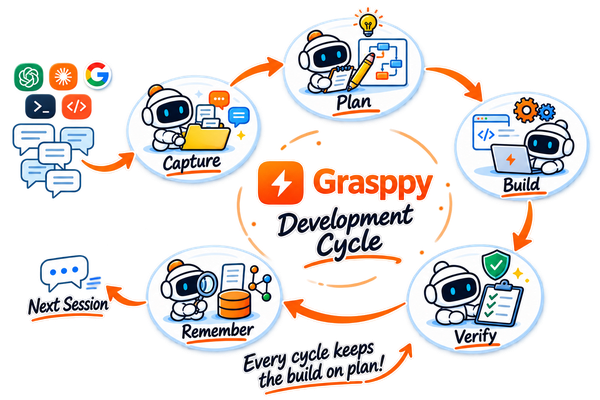
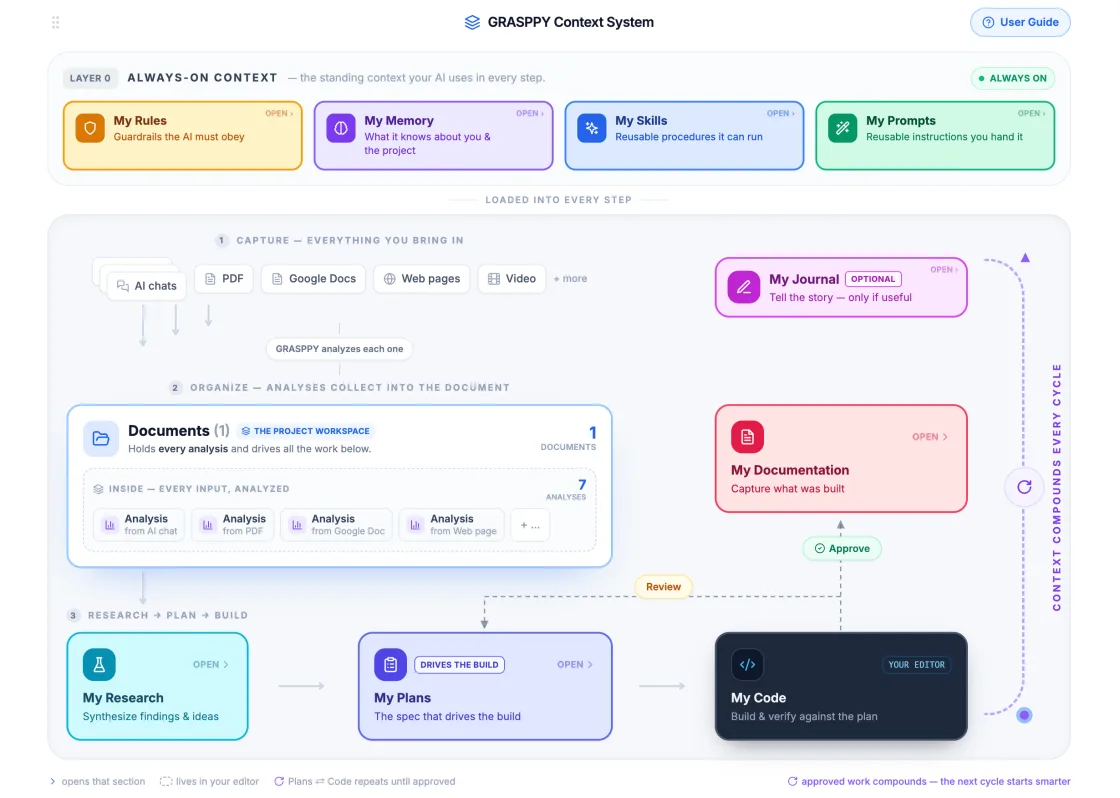
Research, plan, build, capture, repeat. Each pass leaves your rules, memory and code map better than it found them, so the work gets easier as the project gets bigger — which is the opposite of what normally happens.
Every cycle feeds the next one with stronger memory.
Gather what you're learning, before you build.
Turn it into a structured, versioned plan.
Use your rules, memory, and code map while building.
Capture what changed, why it changed, and how to reuse it.
Start the next pass with stronger context.
Every cycle feeds the next: conversations become research, research becomes plans, plans guide code, code becomes documentation, and the next build starts with more context.
See your codebase as modules, files, and dependency links, then give local AI tools a compact reference instead of scattered source files.
The Workflow
Six steps, each one leaving something behind: the captured session, the analysis drawn from it, the research you added, the plan you approved, the build done against that plan, and the verification that says whether the code matches it.
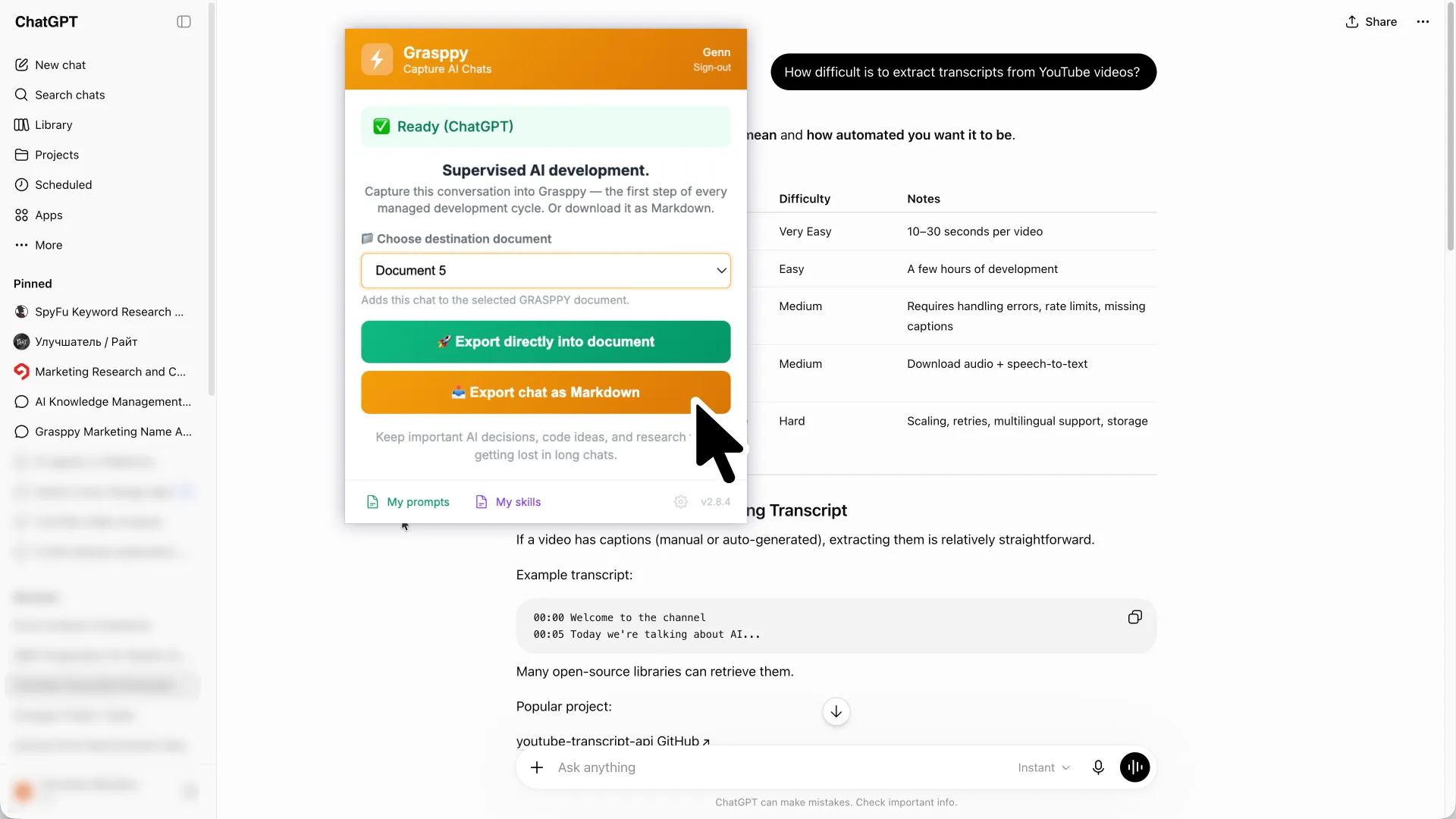
Auto-sync or import AI conversations from coding agents and chat tools. Grasppy extracts decisions, artifacts, problems, ideas, and unfinished work so the session becomes project context you can search and reuse.
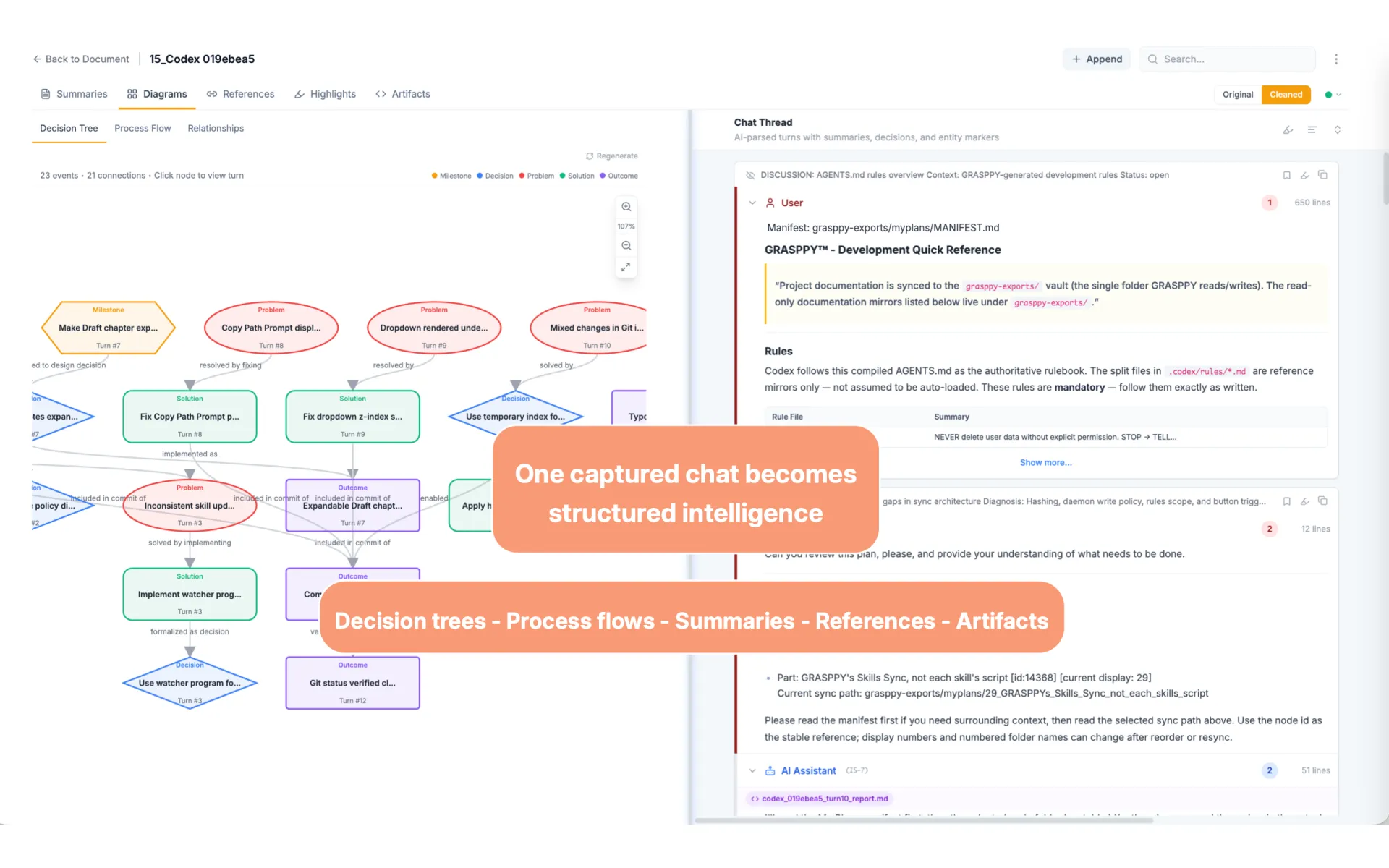
Grasppy parses the session, identifies decisions, entities, artifacts, topics, and useful project knowledge. The conversation stops being a scroll and becomes structured context you can act on.
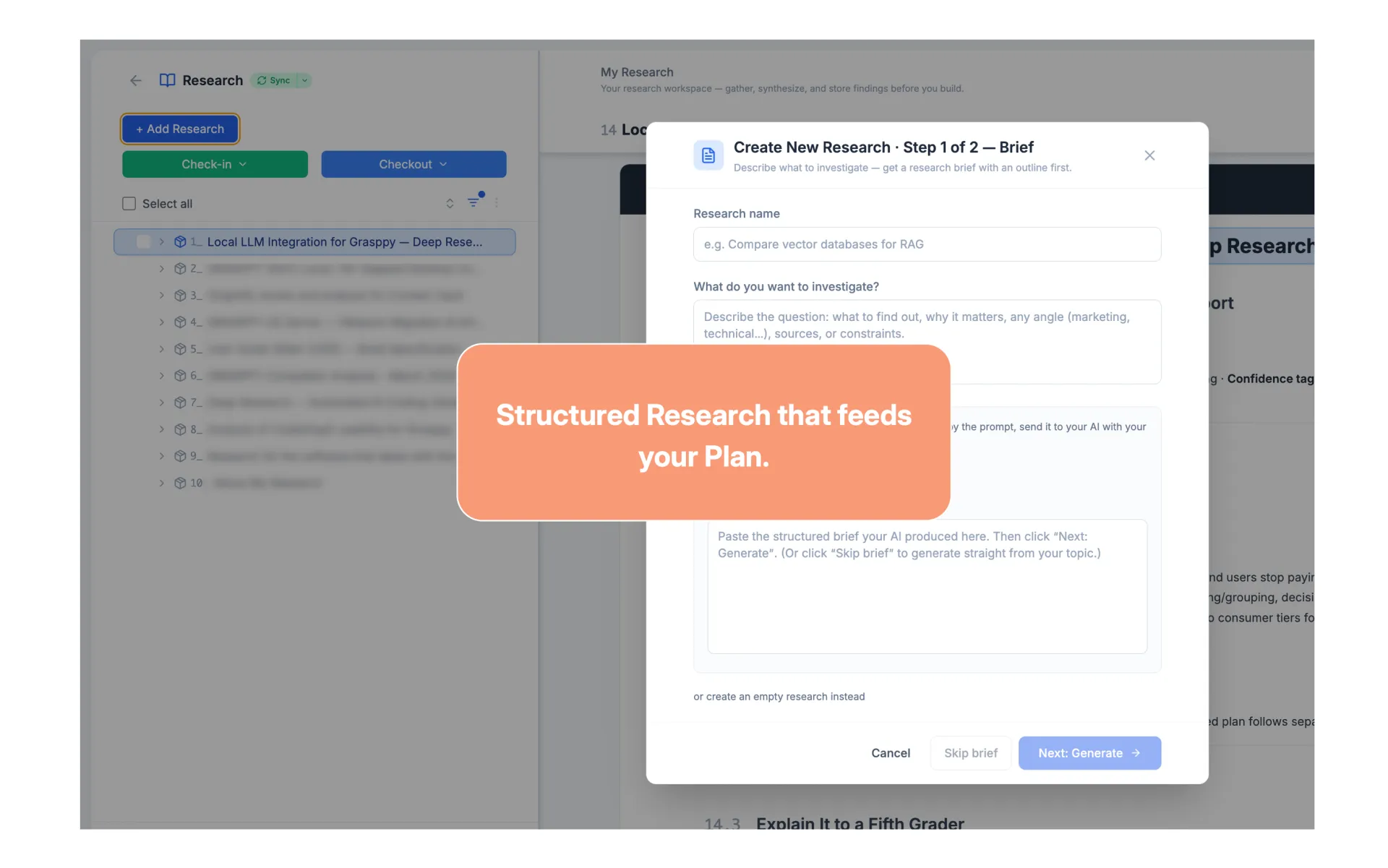
Create focused research when the next decision needs more information. Store it inside the project so research sits beside the work it informed.
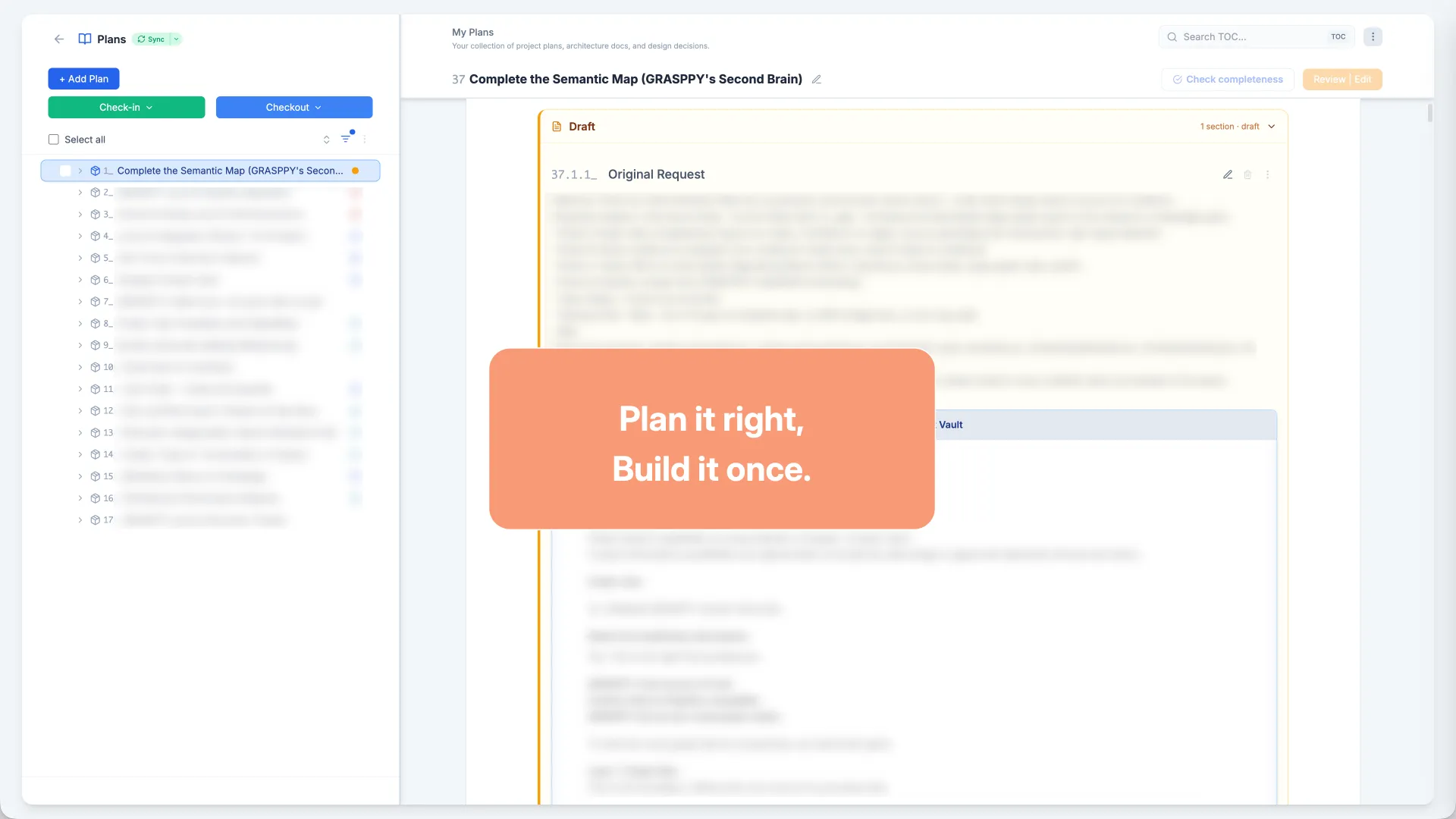
Turn conversations, decisions, and research into a written development plan. Iterate with AI until the plan is clear enough to review, approve, and execute.
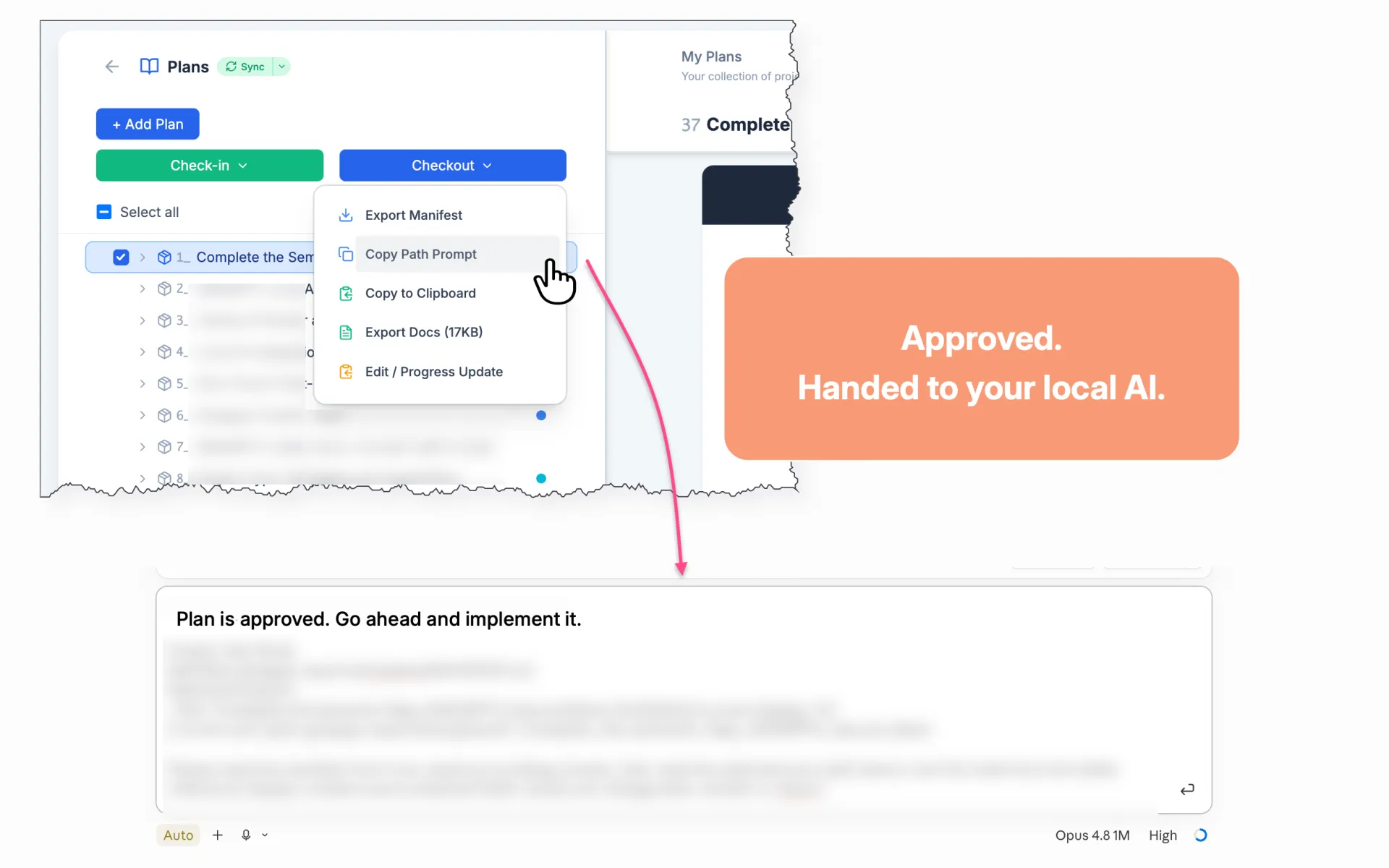
The human approves the plan, then local AI builds from the written steps instead of improvising from a loose prompt. If the plan changes, the change is recorded with it.
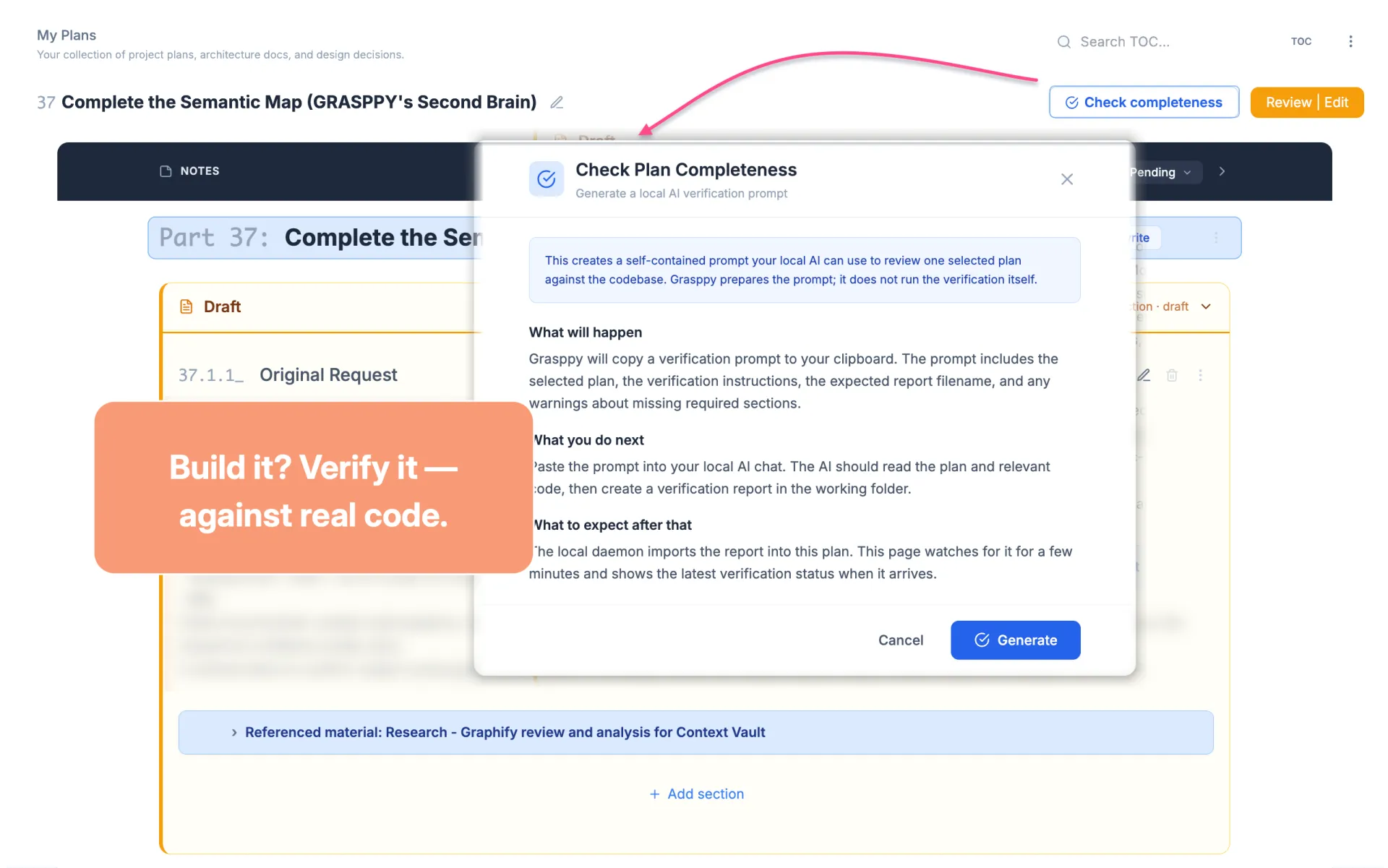
Run a plan review against what was actually built. Missing or incomplete steps are appended to the plan so the work can be corrected, reviewed, and verified again.
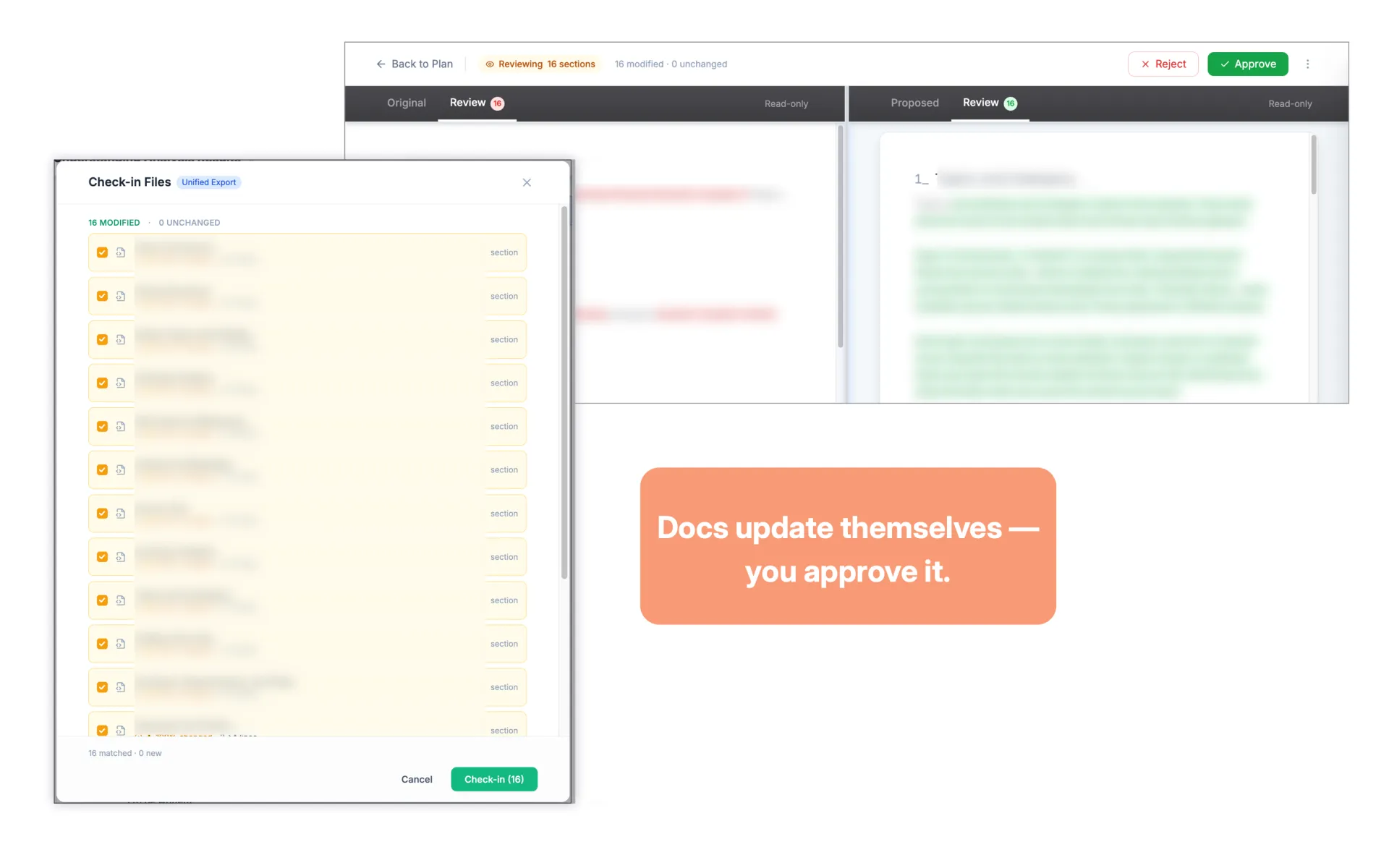
Generate documentation check-ins, approve changes, and keep the project source of truth current. When the work becomes publishable, turn the same verified context into usable content.
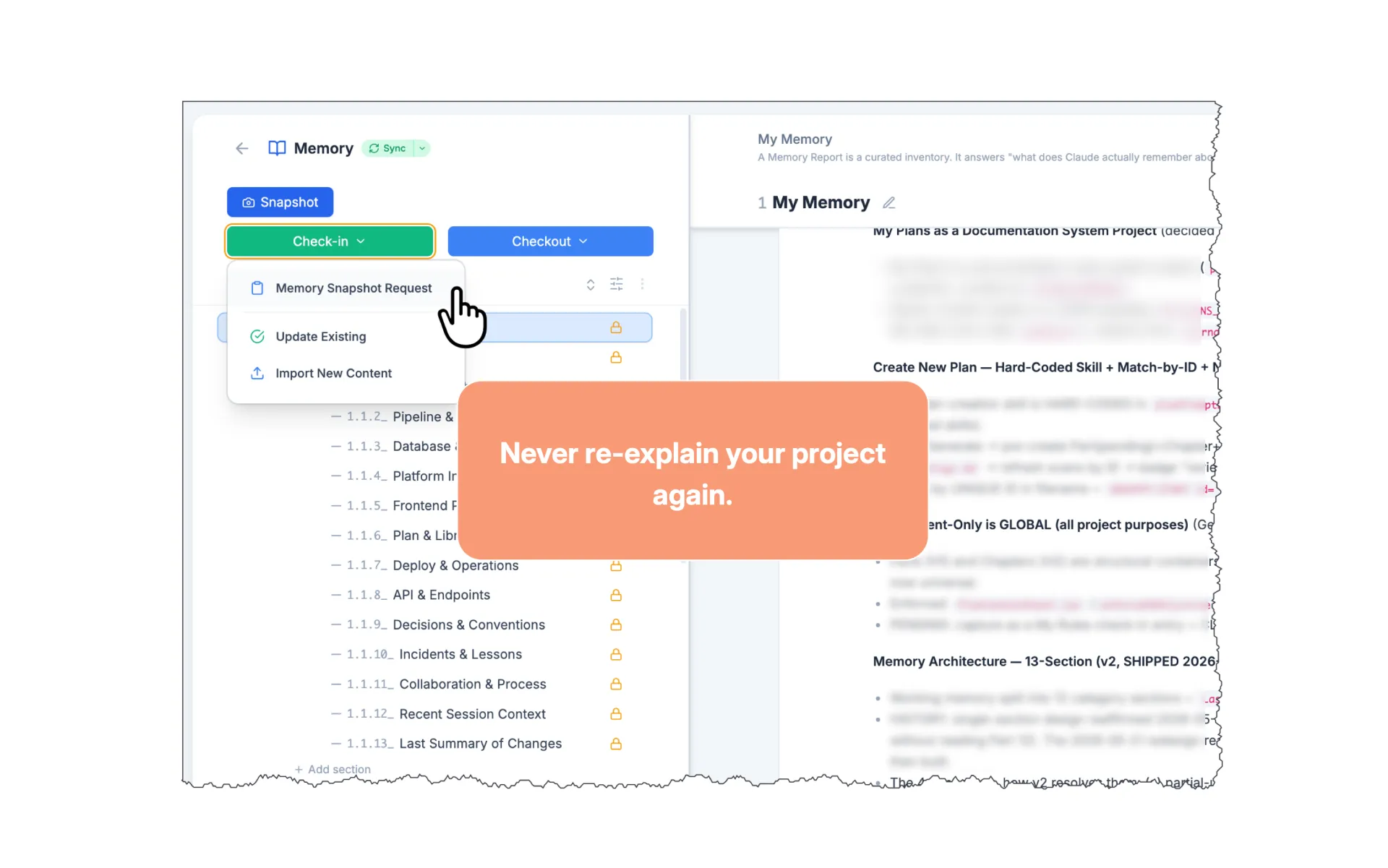
Review the memory snapshot, approve or reject changes, update local AI memory, save the end-of-chat report, and start the next development cycle with better context.
The Solution
Any one of them alone leaves you where you started. Structure without upkeep goes stale. Upkeep without a written answer means re-reading everything. A written answer nobody checked is worse than none.
Every conversation is read and broken into decisions, topics and the files they touched. Not a transcript you scroll — something with a shape you can query.
Documentation rots quietly. It was true yesterday, it still reads as true today, and you only find out when you act on it. This updates as the work does, so what is on the page and what is in the code do not drift apart.
Nothing is filed behind your back. Request, review, approve — every update arrives as a change you can read, accept or reject before it becomes the answer your agents will trust tomorrow.
Context Vault
Grasppy mirrors your AI history, documents, artifacts, memory, rules, plans, and research into a one-way local vault, then organizes it as a visual context graph built for humans and agents.
Context Vault is not a raw export. It is a one-way local mirror plus an intelligent routing layer: root manifests, high-signal indexes, conversation summaries, source-grounded Markdown, and a native visual graph layer inside your local grasppy-exports/ folder. Every extracted insight links back to the exact turn it came from, so you can check it before you reuse it.
CONTEXT.md
root map
indexes/high-signal-turns.tsv
fast search
graph/graph.html
visual map
conversations/
source threads
artifacts/ documents/ analysis/
outputs
Auto-Capture
Every Claude Code, Codex and Cursor session is filed to a folder on your machine as Markdown, automatically, while you work. The browser extension covers the thirteen platforms you use through a tab. Then you decide what comes into Grasppy: tick a batch in one click, untick anything that does not belong, and only those are analysed. Months later you pick the project up from what you kept, instead of explaining it again.
Sessions file themselves locally as you work. The ones you select are extracted, analysed, and folded into the workspace.
What changed, why, and what was approved.
Code, prompts, docs, and generated files.
Project state for the next AI session.
Next steps for verification and build.
Inside Grasppy
Real screens from real workspaces. Every number, chart, and chat below is Grasppy actually in use.
The dashboard shows what you've captured across every AI tool — documents, analyses, artifacts, projects, prompts, skills — alongside a 5-week activity heatmap and a live breakdown of which platforms produced what.
Grasppy's 7-stage pipeline extracts decisions, code, and reasoning from your chat — then renders them as decision trees, process flows, and technical briefs. Every node links back to the exact source turn.
Every workspace organizes into named projects with auto-updating word counts and last-edited timestamps — from Grasppy's own documentation to your user guide, marketing research, skills, prompts, rules, memory, and journal.
Grasppy maps the entities, decisions, and concepts in your conversations into a navigable knowledge graph. Spot patterns across projects, find related work months later, and never lose the thread of an idea.
The Integrations
17 AI platforms. 8 document formats. One knowledge base. Import the conversations and the documents they reference — and search across all of it. More integrations added monthly.

17 platforms supported
Who It's For
Whether you write the code yourself or the AI writes most of it, the trouble arrives the same way: the project grows past what anyone can hold in their head.
Engineers shipping production code with AI — Claude Code, Codex, Cursor, Windsurf, Copilot. Keep every architecture decision tied to the code it produced, and know when the two stop matching.
Founders, designers and vibe coders shipping real products through AI — Lovable, Bolt, Replit, ChatGPT, Claude. Build without writing every line, and still be able to say what is in there and why.
Shared project memory across the whole team — searchable decisions, role-based access to workspaces and documents, and a single source of truth for everything your team discussed with AI.
The tools that write your code do not remember writing it. Grasppy does — and checks what got built against what you planned.
Everything you need to know to get started.
Grasppy is the workspace your AI-built project lives in: it captures every session, keeps the decisions, versions the documentation, and checks each plan against the code that actually exists.
Capture conversations with one click, let Grasppy extract decisions, entities, and artifacts, then use that context for plans, verification, documentation, and the next AI session.
Yes — Grasppy is live. Create your free account and start today. Every new account gets a 14-day Pro trial — no credit card required.
17 integrations. Browser tools via our Chrome extension: Claude, ChatGPT, Gemini, Grok, DeepSeek, Perplexity, Mistral, GitHub Copilot, TypingMind, Replit, Bolt, Lovable, and Voila.
IDE tools via markdown / JSONL import: Cursor, Windsurf, Claude Code, and Codex Desktop.
More integrations are on the roadmap. If your tool exports conversations as markdown, you can already import them today.
Yes — Grasppy uses a Bring Your Own Key (BYOK) model. You connect your own Anthropic, OpenAI, or OpenRouter key, and AI processing costs go directly to your provider at their published rates.
This keeps your subscription affordable and gives you full control over which models run your pipeline.
Pro is $25/mo billed annually ($300/year) or $34/mo billed monthly. Every new account gets a 14-day Pro trial with no credit card required. After the trial, you stay on a free tier with 3 analyses per month — upgrade whenever you're ready. See the pricing page for the full comparison.
AI costs are paid separately through your own provider key (BYOK), typically a few dollars per month for active use.
Grasppy Studio is a content-creation suite built on top of Grasppy. It includes Voice Calibration across 5 dimensions, AI writing through your own local AI agent (zero API cost), a 6-stage SEO surgical-edit pipeline, keyword research via DataForSEO, and a built-in blog with a custom URL.
It's included with your Pro subscription. See the Grasppy Studio landing page for the full feature list.
Notion / Obsidian are blank pages — you have to write and organize everything yourself. Grasppy does that work for you automatically from your AI conversations.
ChatGPT Projects / Claude Projects are locked to one platform and don't extract decisions, link artifacts, or build a searchable knowledge graph across tools. Grasppy works across all your AI tools and turns chat into structured, reusable knowledge.
Secure, yes. Trained on, never. Your conversations are yours. Grasppy does not train models on them, sell data, or share content with third parties.
Data is encrypted in transit and at rest. AI processing runs through your own provider key — meaning your prompts go directly from Grasppy to Anthropic / OpenAI / OpenRouter under your account's terms, not ours.
Yes. Every conversation, document, and artifact can be exported as clean markdown at any time — no lock-in. Your knowledge belongs to you, in a portable format you can take anywhere.
Yes. Every new account gets a 14-day Pro trial — full feature access, no credit card required.
Absolutely. While builders are our core audience, Grasppy works for anyone running long, complex AI conversations: researchers, writers, consultants, students, marketing teams, product managers.
If you use Claude, ChatGPT, or Gemini regularly and want to find, reuse, and continue your work — Grasppy is for you.
Capture, plan, build, verify, remember — and start the next cycle knowing exactly where you left off.
Join Free